christova  

Tech Articles


Collated from various sources. Full copyright remains with original authors.

#architecturepatterns #systemdesign #mvc #microservices #layers #eventdriven

1. Model-View-Controller (MVC):

Overview: The Model-View-Controller (MVC) pattern is a time-honored architectural paradigm that separates an application into three interconnected components:

  • Model: This component represents the data and business logic of the application. It encapsulates the application’s data structure and the rules for manipulating that data.
  • View: Responsible for managing the user interface and displaying information to the user. It receives input from users and sends commands to the controller.
  • Controller: The controller handles user input, updates the model, and refreshes the view accordingly. It acts as an intermediary that processes user input and manages the flow of data between the model and the view.

Uses: MVC is widely employed in web development and GUI-based applications, offering a clear separation of concerns and facilitating easier maintenance and development. This architectural pattern enhances modularity, making it easier to scale and maintain applications over time.

How it Works: Consider a web application where a user interacts with a webpage. When the user performs an action, such as clicking a button, the controller captures this input, updates the underlying data model, and triggers a refresh in the view to reflect the changes. This separation of concerns simplifies the development process and enhances the application’s maintainability.

2. Master-Slave:

Overview: The Master-Slave architecture is a distributed computing model where one central entity, the master node, controls and delegates tasks to subordinate entities known as slave nodes.

  • Master Node: The master node manages the overall state of the system and delegates specific tasks to slave nodes.
  • Slave Node: Each slave node operates independently and reports back to the master node after completing its assigned tasks.

Uses: Master-Slave architecture is commonly employed in scenarios where workload distribution, fault tolerance, and parallel processing are critical. This architecture is particularly useful in data-intensive applications and distributed computing systems.

How it Works: Consider a scenario where a master node is responsible for processing a large dataset. The master node divides the dataset into smaller chunks and assigns each chunk to different slave nodes. Each slave node processes its assigned chunk independently and reports the results back to the master node. This parallel processing approach enhances system performance and fault tolerance.

3. Monolithic Architecture:

Overview: Monolithic Architecture represents a traditional and unified approach where all components of an application are tightly integrated into a single, cohesive unit.

Uses: Suited for smaller projects or those with simpler requirements, Monolithic Architecture simplifies the development process by consolidating all modules, including the user interface, business logic, and data storage, into a single executable unit.

How it Works: In a monolithic architecture, the entire application is treated as a single, indivisible unit. All requests are processed within this unit, and components share the same codebase and memory space. While this architecture simplifies deployment and testing, it may pose challenges as the application grows, particularly in terms of scalability and maintenance.

4. Microservices Architecture:

Overview: Microservices Architecture is a modern approach that decomposes an application into a set of small, independent services. Each service runs its own process and communicates with other services through APIs.

Uses: Ideal for large, complex applications, Microservices Architecture promotes flexibility, scalability, and easier maintenance. It allows services to be developed, deployed, and scaled independently.

How it Works: In a microservices architecture, each service is a self-contained unit with its own data storage, business logic, and user interface. Services communicate with each other through APIs, enabling them to operate independently. This approach enhances scalability, as specific services can be scaled based on demand, and it facilitates continuous delivery and deployment.

5. Event-Driven:

Overview: Event-Driven Architecture relies on events to trigger and communicate between different components. It operates on the principle of asynchronous communication, where events in one part of the system trigger actions or responses in another part.

Uses: Event-Driven Architecture is particularly effective in scenarios with asynchronous communication needs, real-time responsiveness, and loose coupling between components.

How it Works: Components or services in an event-driven architecture communicate through events. When an event occurs, it triggers an action or response in another part of the system. For example, in a messaging application, when a user sends a message, an event is triggered to update the chat interface for both the sender and the recipient.

6. Service-Oriented Architecture (SOA):

Overview: Service-Oriented Architecture (SOA) structures an application as a set of loosely coupled, independent services that communicate with each other. Each service exposes its functionality through standardized protocols.

Uses: SOA is commonly used in enterprise-level applications where interoperability, reusability, and flexibility in integrating diverse systems are essential.

How it Works: In SOA, services are designed to be independent and self-contained, with each service offering specific functionality. These services communicate with each other through standardized protocols, such as Simple Object Access Protocol (SOAP) or Representational State Transfer (REST). SOA fosters reusability, allowing services to be used in various contexts and promoting interoperability between different systems.

7. Layered Architecture:

Overview: Layered Architecture organizes components into horizontal layers, each responsible for specific functionality. This architectural pattern promotes the separation of concerns and modularity.

Uses: Widely employed in applications where a clear separation of concerns is crucial for maintainability and scalability.

How it Works: Each layer in a layered architecture has a specific responsibility, such as presentation, business logic, and data storage. Data flows vertically between layers, ensuring a clear and modular structure. For example, in a web application, the presentation layer handles user input and displays information, the business logic layer processes and manipulates data, and the data storage layer manages the persistence of data.

Conclusion:

As we conclude our deep dive into various architectural patterns, it becomes evident that the choice of a suitable pattern is akin to selecting the right blueprint for constructing a building. Each architectural pattern brings its unique advantages and trade-offs, addressing specific use cases and project requirements.

In the ever-advancing world of technology, the diversity of architectural patterns empowers developers to choose frameworks aligned with their project goals. Whether it’s the modular independence of Microservices Architecture, the structured separation in Layered Architecture, or the responsiveness of Event-Driven architecture, each pattern contributes to the evolution and progress of software design.

Understanding architecture patterns is not just a matter of academic interest; it is a crucial aspect for architects and developers alike. This understanding empowers them to make informed decisions, guiding the creation of software systems that are not only functional but also scalable, maintainable, and adaptable to the ever-changing demands of the digital landscape. As we continue to innovate and push the boundaries of what’s possible in software development, architecture patterns stand as the cornerstone upon which future technological marvels will be built. Their significance lies not only in the past and present but in the continuous shaping of the digital future.

#container #containerisation #designprinciples

Containerization has revolutionized the way applications are developed, deployed, and managed. As organizations increasingly adopt container technologies like Docker and Kubernetes, adhering to fundamental design principles becomes crucial for ensuring efficiency, scalability, and maintainability.

In this article, we explore key container design principles that contribute to the success of containerized applications.

  1. Image Immutability Principle: Container images play a pivotal role in the containerization process. The Image Immutability Principle emphasizes that once a container image is created, it remains unchanged throughout its lifecycle. Any updates or modifications result in the creation of a new image. This principle promotes consistency and reproducibility, ensuring that containers run reliably across various environments.

  2. High Observability Principle: Observability is a critical aspect of containerized applications. The High Observability Principle advocates for comprehensive monitoring and logging mechanisms within containers. This includes tools and practices that provide insights into the container's performance, health, and interactions with other components. A well-observed containerized environment facilitates quick issue detection, troubleshooting, and optimization.

  3. Lifecycle Conformance Principle: Managing the lifecycle of containers involves various stages, from creation and deployment to scaling and termination. The Lifecycle Conformance Principle encourages adhering to a standardized and consistent lifecycle. This ensures that containers are created, updated, and terminated in a predictable manner, simplifying the overall management and orchestration of containerized applications.

  4. Runtime Confinement: Runtime confinement is about isolating containerized applications from their host environments and other containers. This principle ensures that the application runs consistently across diverse environments, preventing conflicts and interference with other services. Runtime confinement contributes to the security, stability, and portability of containerized applications.

  5. Single Concern Principle: The Single Concern Principle advocates for designing containers with a singular focus or responsibility. Each container should perform a specific task or function, promoting modularity and simplicity. By adhering to this principle, containerized applications become more maintainable, scalable, and easier to comprehend, fostering a microservices-oriented architecture.

  6. Self-Containment Principle: Containers should encapsulate all the dependencies and runtime requirements needed to execute an application. The Self-Containment Principle emphasizes that containers should be self-sufficient, eliminating external dependencies on the host system. This ensures consistency and portability, allowing containers to run seamlessly across different environments.

  7. Process Disposability Principle: The Process Disposability Principle encourages treating containers as ephemeral entities. Containers should be designed to start quickly, handle their tasks efficiently, and terminate gracefully when their purpose is fulfilled. This principle aligns with the scalability and resilience aspects of containerized applications, enabling dynamic and efficient resource utilization.

Conclusion: Adhering to these container design principles is essential for building robust, scalable, and maintainable containerized applications. By embracing image immutability, high observability, lifecycle conformance, runtime confinement, single concern, self-containment, and process disposability, organizations can unlock the full potential of container technologies and streamline their development and deployment workflows.

#microservices #bestpractices

1️⃣ Single Responsibility: Imagine a tiny, focused superhero instead of a jack-of-all-trades. That's the essence of single responsibility. Each microservice should do one thing and do it well. This makes them easier to understand, develop, test, and maintain.

2️⃣ Separate Data Stores: Think of each microservice as a vault guarding its own treasure (data). Ideally, they should have dedicated data stores, like separate databases or NoSQL solutions. This isolates them from data issues in other services.

3️⃣ Asynchronous Communication: (but not hand-in-hand) Let your microservices chat through email instead of holding hands across the network. Use asynchronous communication like message queues or pub-sub systems. This decouples services and makes the system more resilient.

4️⃣ Containerization: Docker to the rescue! Containerization packages your microservices into neat, portable containers, ensuring consistent environments and simplifying deployment and scaling.

5️⃣ Orchestration: ️ Think of Kubernetes as the maestro of your container orchestra. It handles load balancing, scaling, and monitoring, making container management a breeze.

6️⃣ Build & Deploy Separation: ️ Imagine building a ship in a shipyard and then launching it from a separate port. That's the idea behind build and deploy separation. Keep these processes distinct to ensure smooth deployment across different environments.

7️⃣ Domain-Driven Design (DDD): DDD helps you navigate the domain of your microservices. It defines clear boundaries and interactions between services, ensuring they align with your business capabilities.

8️⃣ Stateless is the Goal: ‍♀️ Think of microservices as Zen masters – unburdened by state. Store any necessary state in external data stores for easier scaling and maintenance.

9️⃣ Micro Frontends for Web Apps: For web applications, consider the micro frontends approach. Break down the UI into independent components, allowing different teams to develop and deploy them faster.

#devops

Here's a quick dive into some fundamental pillars:

1 Continuous Integration (CI): Automate code integration to catch issues early. CI ensures that your codebase is always in a deployable state, promoting collaboration among developers.

2 Continuous Delivery (CD): Extend CI into the delivery phase, automating the release process. Achieve reliable, rapid, and low-risk releases, enabling your team to respond swiftly to market demands.

3 Configuration Management: Efficiently manage and automate infrastructure configurations. Tools like Ansible or Puppet ensure consistency, making it easier to scale and maintain infrastructure.

4 Infrastructure as Code (IaC): Code your infrastructure to enhance reproducibility and scalability. IaC, with tools like Terraform or CloudFormation, streamlines provisioning and management, reducing manual errors.

5 Health Monitoring & Automated Checks: Proactively monitor system health with automated checks. Utilise tools like Prometheus or Nagios to detect issues early, ensuring optimal performance and reliability.

6 CI/CD Pipelines: Create end-to-end automation pipelines. From code commit to deployment, CI/CD pipelines enhance efficiency, reduce manual intervention, and deliver value faster.

DevOps isn't just a set of practices; it's a cultural shift that fosters collaboration, automation, and continuous improvement. Implementing these components lays the foundation for seamless, reliable software delivery.

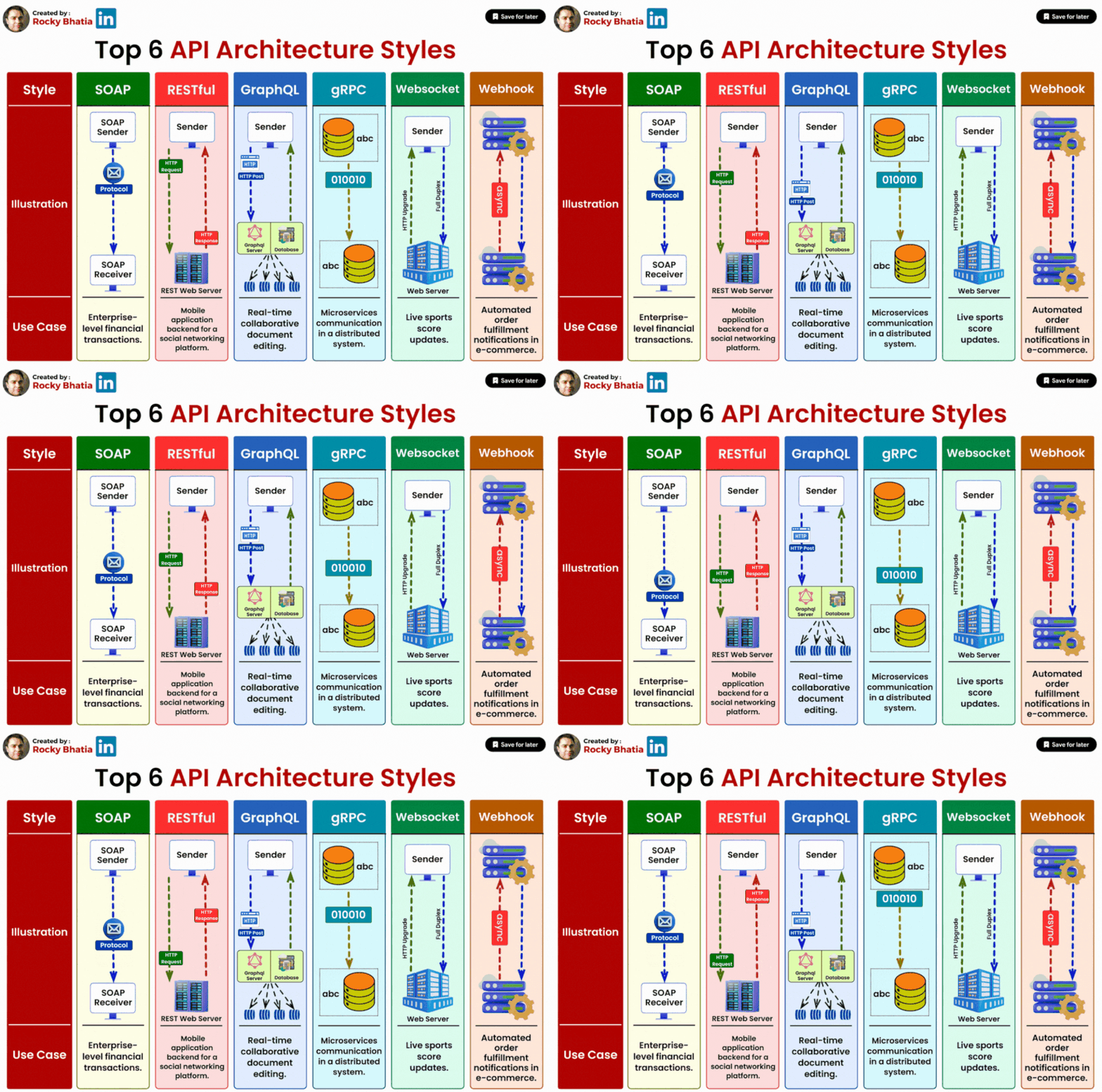
#apiprotocols #api #protocols #rest #graphql #soap

GraphQL: Request exactly what you need, boosting efficiency.

Web hooks: Instant updates via HTTP callbacks for realtime sync.

REST: Simple, scalable, and stateless, popular for web services.

SSE (ServerSent Events): Perfect for realtime updates and dynamic content.

EDI: Standardised document exchanges for streamlined transactions.

EDA: Event based communication, promoting scalability.

WebSockets: Two-way realtime communication for apps like chat.

SOAP: Reliable, secure communication with structured rules.

gRPC: High performance, fast service to service communication.

MQTT: Lightweight, ideal for IoT devices with low latency needs.

AMQP: Versatile, robust for scalable messaging systems.

#systemdesign #webapplication #template

𝐌𝐚𝐬𝐭𝐞𝐫 𝐭𝐞𝐦𝐩𝐥𝐚𝐭𝐞 𝐟𝐨𝐫 𝐛𝐮𝐢𝐥𝐝𝐢𝐧𝐠 𝐚𝐧𝐲 𝐰𝐞𝐛 𝐚𝐩𝐩𝐥𝐢𝐜𝐚𝐭𝐢𝐨𝐧 𝐚𝐫𝐜𝐡𝐢𝐭𝐞𝐜𝐭𝐮𝐫𝐞

1. Customers: End users who interact with the web application.

2. DNS (Domain Name System): Translates domain names into IP addresses.

3. Load Balancer: Distributes traffic across multiple servers for improved performance and availability.

4. Cache: Stores frequently accessed data for faster retrieval and reduced backend load.

5. Front-end: The user interface responsible for rendering, user input handling, and backend communication.

6. Message Queue: Manages asynchronous communication and tasks between front-end and back-end.

7. Back-end (Web Services): Contains business logic and handles user requests and data interactions.

8. Data Store: Stores and retrieves application data, including databases or other data storage systems.

9. Search Engine: Performs complex searches on large data sets efficiently (e.g., Elasticsearch).

10. CDN (Content Delivery Network): Distributes static assets for faster page loading and improved user experience.

11. Queue Workers: Process tasks from message queues, offloading resource-intensive operations.

These components work together to create a web application architecture that delivers a responsive and seamless user experience. The choice and configuration of these components depend on the specific requirements and goals of the application.

Enter your email to subscribe to updates.