christova  

Tech Articles


Collated from various sources. Full copyright remains with original authors.

Categories of Design Patterns:

1. Creational: Focuses on flexible object creation, making the system independent of specific instantiation methods.

2. Behavioral: Defines interaction and communication patterns between objects.

3. Structural: Manages class and object composition, allowing for efficient and flexible system structures.

Top 10 Design Patterns with Real-Life Examples:

1. Singleton: Ensures a single instance (e.g., printer spooler).

2. Factory: Creates objects without specifying exact classes (e.g., car factory).

3. Adapter: Adapts interfaces for compatibility (e.g., universal power adapter).

4. Facade: Simplifies complex systems (e.g., remote control for home entertainment).

5. Decorator: Adds behavior dynamically (e.g., pizza toppings).

6. Proxy: Controls access as an intermediary (e.g., proxy server).

7. Command: Queues requests as objects (e.g., remote control with device buttons).

8. Template Method: Defines algorithm skeletons for customization (e.g., baking recipes).

9. Strategy: Provides interchangeable algorithms (e.g., online payment methods).

10. Observer: Updates dependencies automatically (e.g., weather app subscriptions).

#designpatterns

#linux #filesystem

How Linux Works

Embark on a journey through the intricate workings of a Linux system, from the moment you hit the power button to the seamless execution of your commands and programs. Dive into the orchestration between user interaction and kernel management that powers every aspect of your computing experience.

Power On: Your journey starts with the push of that power button. The system comes to life, and the BIOS (Basic Input/Output System) kicks in, ensuring your hardware is in top shape.

Master Boot Record: BIOS hands over control to the MBR on your hard disk, which then directs the boot loader to its designated spot.

Boot loader: Picture the boot loader as the conductor, signaling for the kernel to take the stage.

4️⃣ Kernel: Ah, the kernel – Linux's heart and soul. It acts as the liaison between your hardware and the tasks you want to perform.

5️⃣ Initial RAM: The kernel settles into memory, and the system initializes with '/sbin/init' at the helm.

6️⃣ User Space: Now you're in control, with the shell and GUI ready to take your commands.

🔁 Cycle of Operation: - User Mode: You interact with the system, requesting programs or commands to run. - System Mode: When tasks require more privilege, like hardware access, the kernel intervenes, managing requests securely.

🛠️ Kernel's Toolbox: - Process Management: Handling the multitude of tasks you've got going. - Memory Management: Allocating space for your applications and data. - Device Drivers: Communicating with your hardware, from mouse to USB drive. - System Calls: Special requests made by programs. - File System Management: Organizing and storing your files securely.

🧠 Brain of the Operation: The kernel communicates with CPU, memory, disk, and network to ensure smooth execution of your commands and programs.

#database #sql #nosql #acid #aws #azure #gcp

Here are steps to help you choose the appropriate database:

𝗨𝗻𝗱𝗲𝗿𝘀𝘁𝗮𝗻𝗱 𝗬𝗼𝘂𝗿 𝗗𝗮𝘁𝗮 𝗥𝗲𝗾𝘂𝗶𝗿𝗲𝗺𝗲𝗻𝘁𝘀

Analyze the nature of your data, including its structure, volume, and complexity. Determine if your data is structured (relational), semistructured (like JSON or XML), or unstructured (e.g., text, images). Consider the growth rate of your data and whether it's transactional or analytical.

𝗜𝗱𝗲𝗻𝘁𝗶𝗳𝘆 𝗬𝗼𝘂𝗿 𝗨𝘀𝗲 𝗖𝗮𝘀𝗲𝘀:

Define the specific use cases your application will have, such as read heavy, write heavy, complex queries, realtime analytics, or simple CRUD operations.

𝗦𝗰𝗮𝗹𝗮𝗯𝗶𝗹𝗶𝘁𝘆 𝗥𝗲𝗾𝘂𝗶𝗿𝗲𝗺𝗲𝗻𝘁𝘀:

Determine if your application needs to scale horizontally (adding more servers) or vertically (upgrading server resources). Look at the database's ability to handle increased loads and traffic.

𝗗𝗮𝘁𝗮 𝗖𝗼𝗻𝘀𝗶𝘀𝘁𝗲𝗻𝗰𝘆:

Decide whether your application requires strict ACID (Atomicity, Consistency, Isolation, Durability) compliance or if eventual consistency is acceptable.

𝗤𝘂𝗲𝗿𝘆 𝗖𝗼𝗺𝗽𝗹𝗲𝘅𝗶𝘁𝘆:

Consider the types of queries your application will run and whether the database can efficiently handle them. Evaluate the indexing and querying capabilities.

𝐃𝐚𝐭𝐚 𝐌𝐨𝐝𝐞𝐥:

Choose between relational databases (SQL) and NoSQL databases based on your data structure and query requirements.

𝗖𝗼𝗺𝗽𝗮𝘁𝗶𝗯𝗶𝗹𝗶𝘁𝘆 𝘄𝗶𝘁𝗵 𝗧𝗲𝗰𝗵𝗻𝗼𝗹𝗼𝗴𝘆 𝗦𝘁𝗮𝗰𝗸:

Ensure that the selected database integrates well with your existing technology stack and frameworks.

𝗙𝘂𝘁𝘂𝗿𝗲 𝗚𝗿𝗼𝘄𝘁𝗵:

Think about the longterm scalability and growth of your application and whether the chosen database can accommodate future needs.

Based on my understanding, I've compiled a list of databases, which I've updated from the diagram initially provided by Satish Gupta. Please note that this list may not cover all databases, and I might have overlooked some. Additionally, there may be databases that can serve multiple use cases. The intention here is to categorise databases based on use cases or sql/nosql/newsql databases

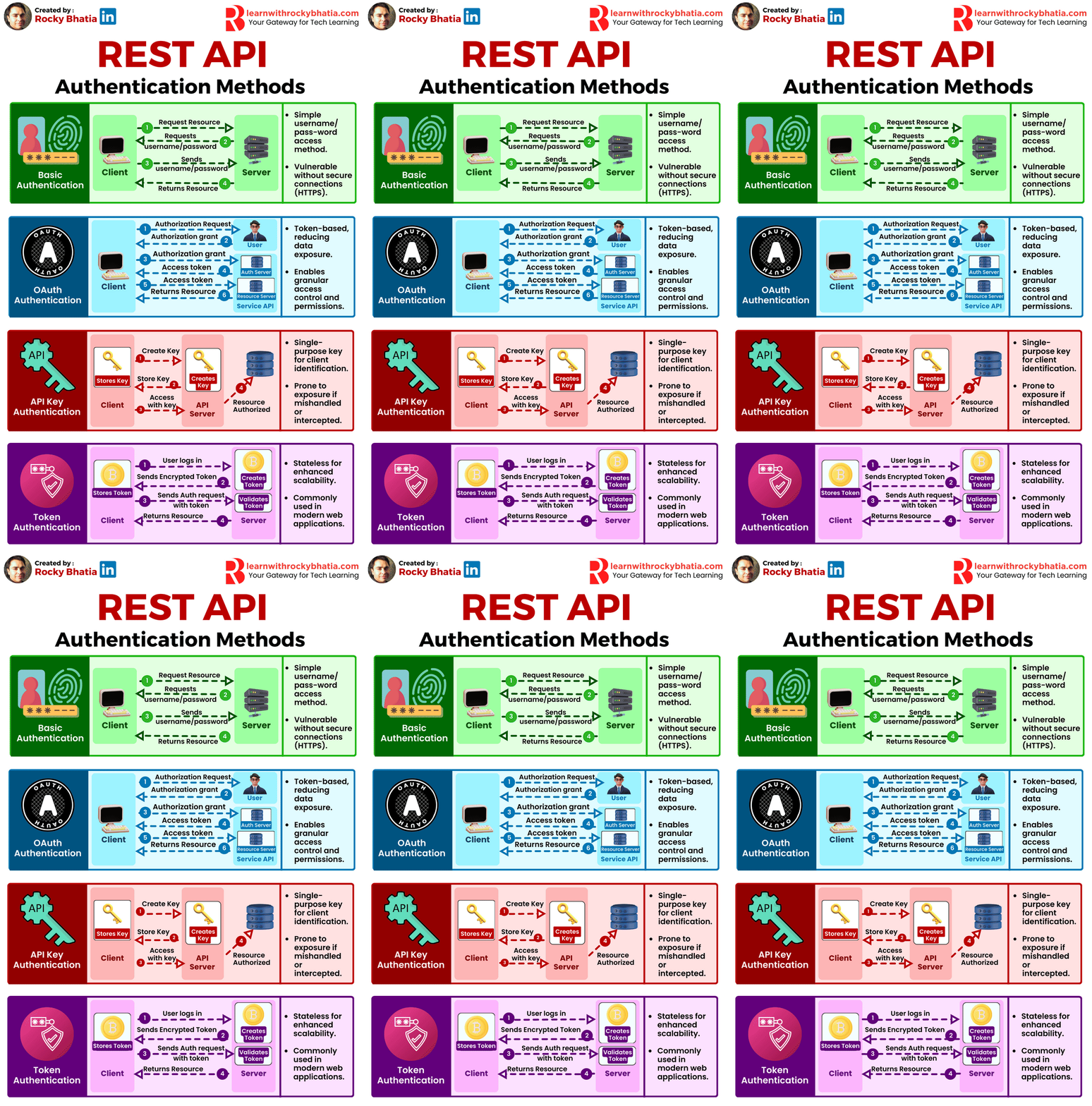
#authentication #credentials #ssh #oauth #ssl

In today's tech landscape, authentication stands as the sentinel guarding our digital interactions. It's the shield against unauthorised access and data breaches, ensuring the sanctity of sensitive information and user trust.

🔐 Let's break down the top four authentication mechanisms:

1️⃣ Credentials: The classic username-password combo. Simple yet susceptible to attacks like brute force and phishing if not fortified properly.

2️⃣ SSH Keys: A robust method for remote access, leveraging cryptographic keys to grant entry securely.

3️⃣ OAuth 2.0: The backbone of secure web and mobile app interactions, allowing limited access without compromising login credentials.

4️⃣ SSL Certificates: Safeguarding data transmission through encryption, ensuring secure online transactions and communications.

Top 5 Kafka Use Cases Transforming Industries:

Data Streaming 🌊: Monitor and act on real-time data across your organization.

Log Aggregation 📚: Manage large volumes of log data efficiently.

Message Queue 📨: Scale microservices communications with fault tolerance.

Web Activity Tracker 🕵️‍♂️: Customize user experiences with real-time insights.

Data Replication 🔁: Sync data seamlessly across systems.

Kafka simplifies real-time data processing and ensures high availability with its robust architecture. Here’s a breakdown of its key components:

🔹 Producer: Initiates data streams, pushing records into Kafka topics for processing. 🔹 Consumer: Receives and processes data from Kafka topics, driving real-time analytics and applications. 🔹 Broker: The core unit of Kafka infrastructure, managing data storage, distribution, and replication. 🔹 Replica: Ensures fault tolerance and data durability by replicating partitions across multiple brokers. 🔹 Cluster: A collection of Kafka brokers working together to handle data streams and ensure high availability. 🔹 Topic: Logical channels for organizing and categorizing data streams in Kafka. 🔹 Partitions: Divides topics into smaller, scalable units, enabling parallel processing and load balancing. 🔹 Leader Replica: Handles read and write operations for a partition, ensuring consistency and reliability. 🔹 Follower Replica: Replicates data from leader replicas, providing redundancy and fault tolerance.

Kafka is designed to make data streaming seamless and efficient, empowering your real-time data analytics and applications.

#kafka #messagequeues

#messagequeues #kafka #rabbitmq #sqs #solace #messagebrokers

Choosing the wrong messaging system doesn't just slow you down. It breaks your architecture at scale.

Every senior engineer eventually faces this decision 👇

Kafka, RabbitMQ, SQS, and Solace all move messages. But they solve fundamentally different problems. And picking the wrong one for your use case is a silent, expensive mistake.

Here's how they actually differ:

Kafka – Built for distributed streaming at scale → Log-based stream, long retention, strong replay support → Best for: Streaming pipelines and data teams

RabbitMQ – The classic message broker → Queue-based routing, exchange routing, flexible bindings → Best for: App messaging and backend teams

SQS – Managed, serverless, AWS-native → Poll-based queue, managed auto-scaling, limited retention → Best for: AWS decoupling and cloud teams

Solace – Enterprise-grade event mesh → Topic-based routing, cross-cloud connectivity, hybrid support → Best for: Enterprise distribution and integration teams

The key differences at a glance: → Retention – Kafka and Solace win. SQS and RabbitMQ are limited. → Replay – Only Kafka offers strong native replay support → Scaling – Kafka scales partitions. SQS auto-scales. Solace meshes brokers. → Protocol – Solace supports the widest range of protocols natively

The decision isn't about which tool is best. It's about which tool fits your traffic pattern, team, and infrastructure.

Pick Kafka when you need stream processing and replay. Pick RabbitMQ when you need flexible routing between services. Pick SQS when you're deep in AWS and want zero ops overhead. Pick Solace when you're building enterprise-grade, cross-cloud event distribution.

#APIGateway

1. Client Request Entry

Web, mobile, or service clients send requests into a single gateway endpoint.

2. Request Authentication

Gateway validates identity via tokens, API keys, or OAuth before anything moves forward.

3. Rate Limiting

Controls traffic volume to prevent overload and ensure fair resource usage.

4. Request Validation

Checks headers, parameters, and payload format before routing downstream.

5. Routing Logic

Directs requests to the correct backend service based on paths, rules, or load strategy.

6. Load Balancing

Distributes traffic across service instances for scalability and reliability.

7. Protocol Translation

Converts between REST, gRPC, SOAP, or WebSockets when systems speak different languages.

8. Request Transformation

Modifies headers or payloads to match backend service expectations.

9. Backend Service Call

Gateway forwards the validated request to internal microservices or external APIs.

10. Response Aggregation

Combines responses from multiple services into a single unified result.

11. Response Transformation

Formats the response structure, headers, or data for client compatibility.

12. Monitoring & Logging

Every request tracked – latency, errors, usage patterns. The observability layer that keeps production sane.

13. Response Delivery

Final response securely returned to the client through the optimized gateway path.

Tools doing the heavy lifting: Kong, Envoy, NGINX, Apigee, AWS API Gateway, Traefik – each handling different layers of this flow.

The API Gateway isn't just a proxy.

It's the security, reliability, and observability layer your entire system depends on.

#architecturepatterns #systemdesign #mvc #microservices #layers #eventdriven

1. Model-View-Controller (MVC):

Overview: The Model-View-Controller (MVC) pattern is a time-honored architectural paradigm that separates an application into three interconnected components:

  • Model: This component represents the data and business logic of the application. It encapsulates the application’s data structure and the rules for manipulating that data.
  • View: Responsible for managing the user interface and displaying information to the user. It receives input from users and sends commands to the controller.
  • Controller: The controller handles user input, updates the model, and refreshes the view accordingly. It acts as an intermediary that processes user input and manages the flow of data between the model and the view.

Uses: MVC is widely employed in web development and GUI-based applications, offering a clear separation of concerns and facilitating easier maintenance and development. This architectural pattern enhances modularity, making it easier to scale and maintain applications over time.

How it Works: Consider a web application where a user interacts with a webpage. When the user performs an action, such as clicking a button, the controller captures this input, updates the underlying data model, and triggers a refresh in the view to reflect the changes. This separation of concerns simplifies the development process and enhances the application’s maintainability.

2. Master-Slave:

Overview: The Master-Slave architecture is a distributed computing model where one central entity, the master node, controls and delegates tasks to subordinate entities known as slave nodes.

  • Master Node: The master node manages the overall state of the system and delegates specific tasks to slave nodes.
  • Slave Node: Each slave node operates independently and reports back to the master node after completing its assigned tasks.

Uses: Master-Slave architecture is commonly employed in scenarios where workload distribution, fault tolerance, and parallel processing are critical. This architecture is particularly useful in data-intensive applications and distributed computing systems.

How it Works: Consider a scenario where a master node is responsible for processing a large dataset. The master node divides the dataset into smaller chunks and assigns each chunk to different slave nodes. Each slave node processes its assigned chunk independently and reports the results back to the master node. This parallel processing approach enhances system performance and fault tolerance.

3. Monolithic Architecture:

Overview: Monolithic Architecture represents a traditional and unified approach where all components of an application are tightly integrated into a single, cohesive unit.

Uses: Suited for smaller projects or those with simpler requirements, Monolithic Architecture simplifies the development process by consolidating all modules, including the user interface, business logic, and data storage, into a single executable unit.

How it Works: In a monolithic architecture, the entire application is treated as a single, indivisible unit. All requests are processed within this unit, and components share the same codebase and memory space. While this architecture simplifies deployment and testing, it may pose challenges as the application grows, particularly in terms of scalability and maintenance.

4. Microservices Architecture:

Overview: Microservices Architecture is a modern approach that decomposes an application into a set of small, independent services. Each service runs its own process and communicates with other services through APIs.

Uses: Ideal for large, complex applications, Microservices Architecture promotes flexibility, scalability, and easier maintenance. It allows services to be developed, deployed, and scaled independently.

How it Works: In a microservices architecture, each service is a self-contained unit with its own data storage, business logic, and user interface. Services communicate with each other through APIs, enabling them to operate independently. This approach enhances scalability, as specific services can be scaled based on demand, and it facilitates continuous delivery and deployment.

5. Event-Driven:

Overview: Event-Driven Architecture relies on events to trigger and communicate between different components. It operates on the principle of asynchronous communication, where events in one part of the system trigger actions or responses in another part.

Uses: Event-Driven Architecture is particularly effective in scenarios with asynchronous communication needs, real-time responsiveness, and loose coupling between components.

How it Works: Components or services in an event-driven architecture communicate through events. When an event occurs, it triggers an action or response in another part of the system. For example, in a messaging application, when a user sends a message, an event is triggered to update the chat interface for both the sender and the recipient.

6. Service-Oriented Architecture (SOA):

Overview: Service-Oriented Architecture (SOA) structures an application as a set of loosely coupled, independent services that communicate with each other. Each service exposes its functionality through standardized protocols.

Uses: SOA is commonly used in enterprise-level applications where interoperability, reusability, and flexibility in integrating diverse systems are essential.

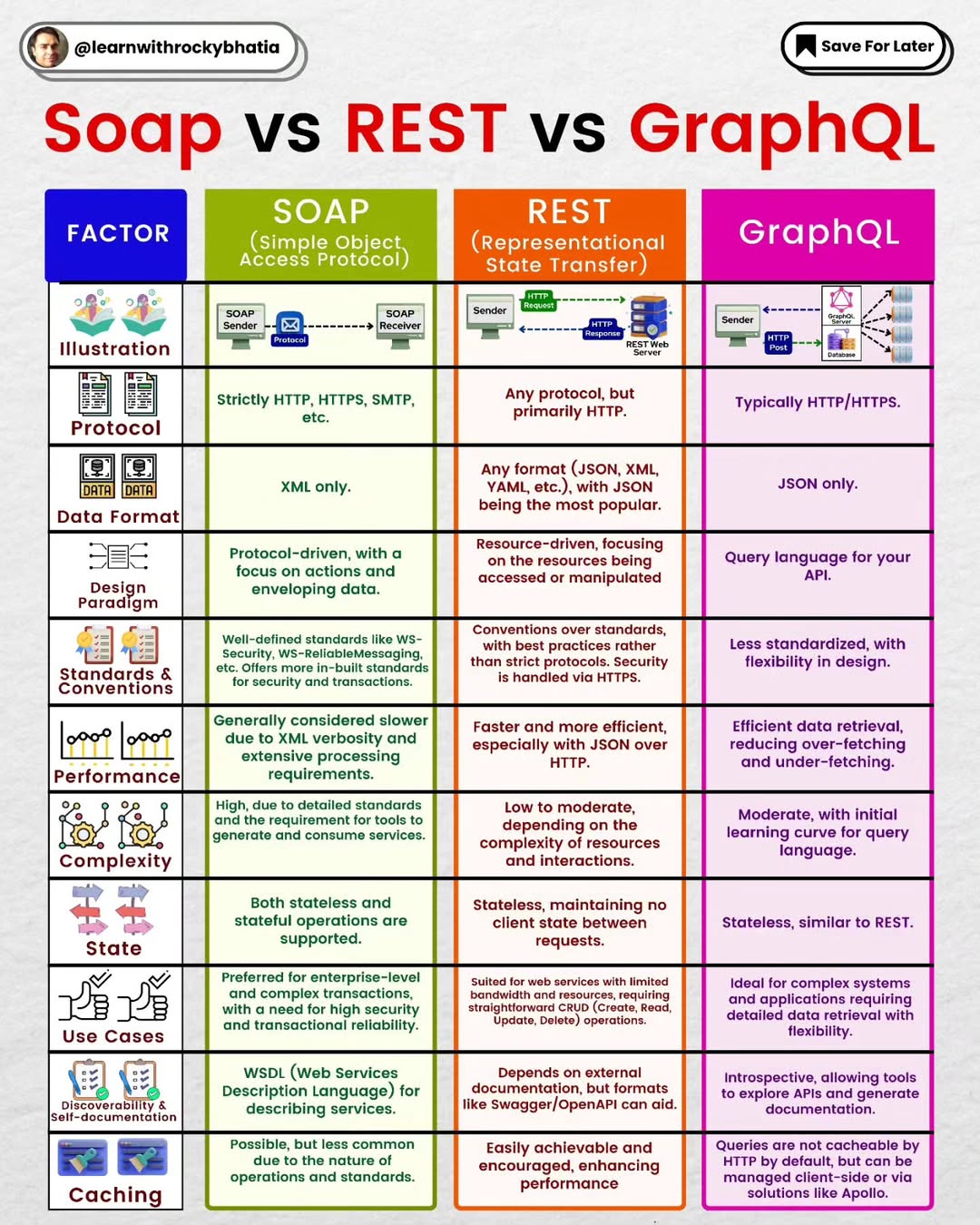
How it Works: In SOA, services are designed to be independent and self-contained, with each service offering specific functionality. These services communicate with each other through standardized protocols, such as Simple Object Access Protocol (SOAP) or Representational State Transfer (REST). SOA fosters reusability, allowing services to be used in various contexts and promoting interoperability between different systems.

7. Layered Architecture:

Overview: Layered Architecture organizes components into horizontal layers, each responsible for specific functionality. This architectural pattern promotes the separation of concerns and modularity.

Uses: Widely employed in applications where a clear separation of concerns is crucial for maintainability and scalability.

How it Works: Each layer in a layered architecture has a specific responsibility, such as presentation, business logic, and data storage. Data flows vertically between layers, ensuring a clear and modular structure. For example, in a web application, the presentation layer handles user input and displays information, the business logic layer processes and manipulates data, and the data storage layer manages the persistence of data.

Conclusion:

As we conclude our deep dive into various architectural patterns, it becomes evident that the choice of a suitable pattern is akin to selecting the right blueprint for constructing a building. Each architectural pattern brings its unique advantages and trade-offs, addressing specific use cases and project requirements.

In the ever-advancing world of technology, the diversity of architectural patterns empowers developers to choose frameworks aligned with their project goals. Whether it’s the modular independence of Microservices Architecture, the structured separation in Layered Architecture, or the responsiveness of Event-Driven architecture, each pattern contributes to the evolution and progress of software design.

Understanding architecture patterns is not just a matter of academic interest; it is a crucial aspect for architects and developers alike. This understanding empowers them to make informed decisions, guiding the creation of software systems that are not only functional but also scalable, maintainable, and adaptable to the ever-changing demands of the digital landscape. As we continue to innovate and push the boundaries of what’s possible in software development, architecture patterns stand as the cornerstone upon which future technological marvels will be built. Their significance lies not only in the past and present but in the continuous shaping of the digital future.

#container #containerisation #designprinciples

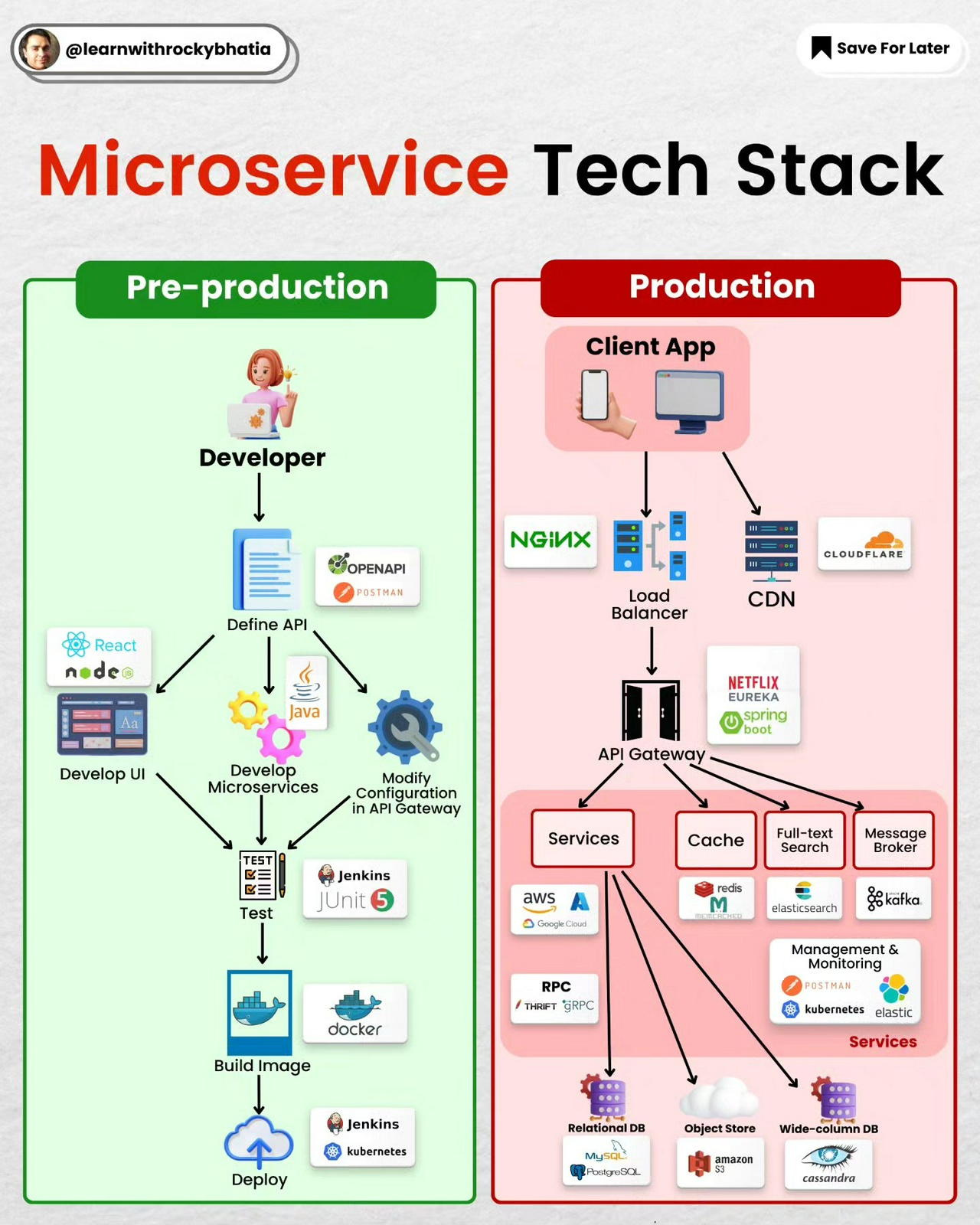
Containerization has revolutionized the way applications are developed, deployed, and managed. As organizations increasingly adopt container technologies like Docker and Kubernetes, adhering to fundamental design principles becomes crucial for ensuring efficiency, scalability, and maintainability.

In this article, we explore key container design principles that contribute to the success of containerized applications.

  1. Image Immutability Principle: Container images play a pivotal role in the containerization process. The Image Immutability Principle emphasizes that once a container image is created, it remains unchanged throughout its lifecycle. Any updates or modifications result in the creation of a new image. This principle promotes consistency and reproducibility, ensuring that containers run reliably across various environments.

  2. High Observability Principle: Observability is a critical aspect of containerized applications. The High Observability Principle advocates for comprehensive monitoring and logging mechanisms within containers. This includes tools and practices that provide insights into the container's performance, health, and interactions with other components. A well-observed containerized environment facilitates quick issue detection, troubleshooting, and optimization.

  3. Lifecycle Conformance Principle: Managing the lifecycle of containers involves various stages, from creation and deployment to scaling and termination. The Lifecycle Conformance Principle encourages adhering to a standardized and consistent lifecycle. This ensures that containers are created, updated, and terminated in a predictable manner, simplifying the overall management and orchestration of containerized applications.

  4. Runtime Confinement: Runtime confinement is about isolating containerized applications from their host environments and other containers. This principle ensures that the application runs consistently across diverse environments, preventing conflicts and interference with other services. Runtime confinement contributes to the security, stability, and portability of containerized applications.

  5. Single Concern Principle: The Single Concern Principle advocates for designing containers with a singular focus or responsibility. Each container should perform a specific task or function, promoting modularity and simplicity. By adhering to this principle, containerized applications become more maintainable, scalable, and easier to comprehend, fostering a microservices-oriented architecture.

  6. Self-Containment Principle: Containers should encapsulate all the dependencies and runtime requirements needed to execute an application. The Self-Containment Principle emphasizes that containers should be self-sufficient, eliminating external dependencies on the host system. This ensures consistency and portability, allowing containers to run seamlessly across different environments.

  7. Process Disposability Principle: The Process Disposability Principle encourages treating containers as ephemeral entities. Containers should be designed to start quickly, handle their tasks efficiently, and terminate gracefully when their purpose is fulfilled. This principle aligns with the scalability and resilience aspects of containerized applications, enabling dynamic and efficient resource utilization.

Conclusion: Adhering to these container design principles is essential for building robust, scalable, and maintainable containerized applications. By embracing image immutability, high observability, lifecycle conformance, runtime confinement, single concern, self-containment, and process disposability, organizations can unlock the full potential of container technologies and streamline their development and deployment workflows.

Enter your email to subscribe to updates.