SQL
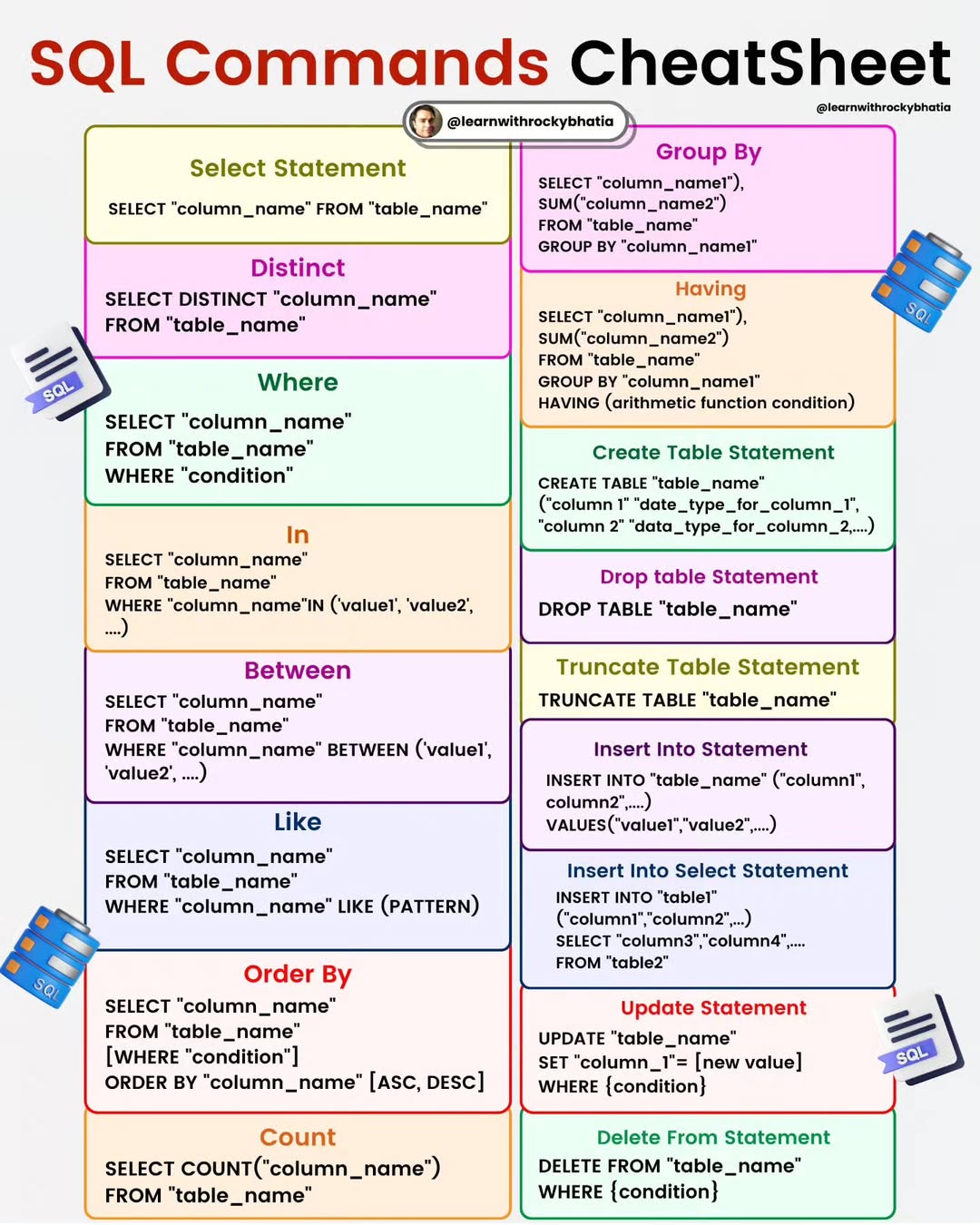
SQL CheatSheet
To embark on your journey into the realm of SQL mastery, Please follow following guide:
- Understand what databases are and how they store and organise data.
- Learn about the difference between relational databases and other types of databases. - Familiarise yourself with the basic syntax of SQL queries. -Learn how to use SQL to retrieve data from a database using the SELECT statement.
- Explore different clauses like WHERE, ORDER BY, GROUP BY, and HAVING to filter, sort, and group data.
- Learn how to use aggregate functions like COUNT, SUM, AVG, MIN, and MAX.
- Understand how to use INSERT, UPDATE, and DELETE statements to modify data in a database.
- Learn about constraints and how to maintain data integrity.
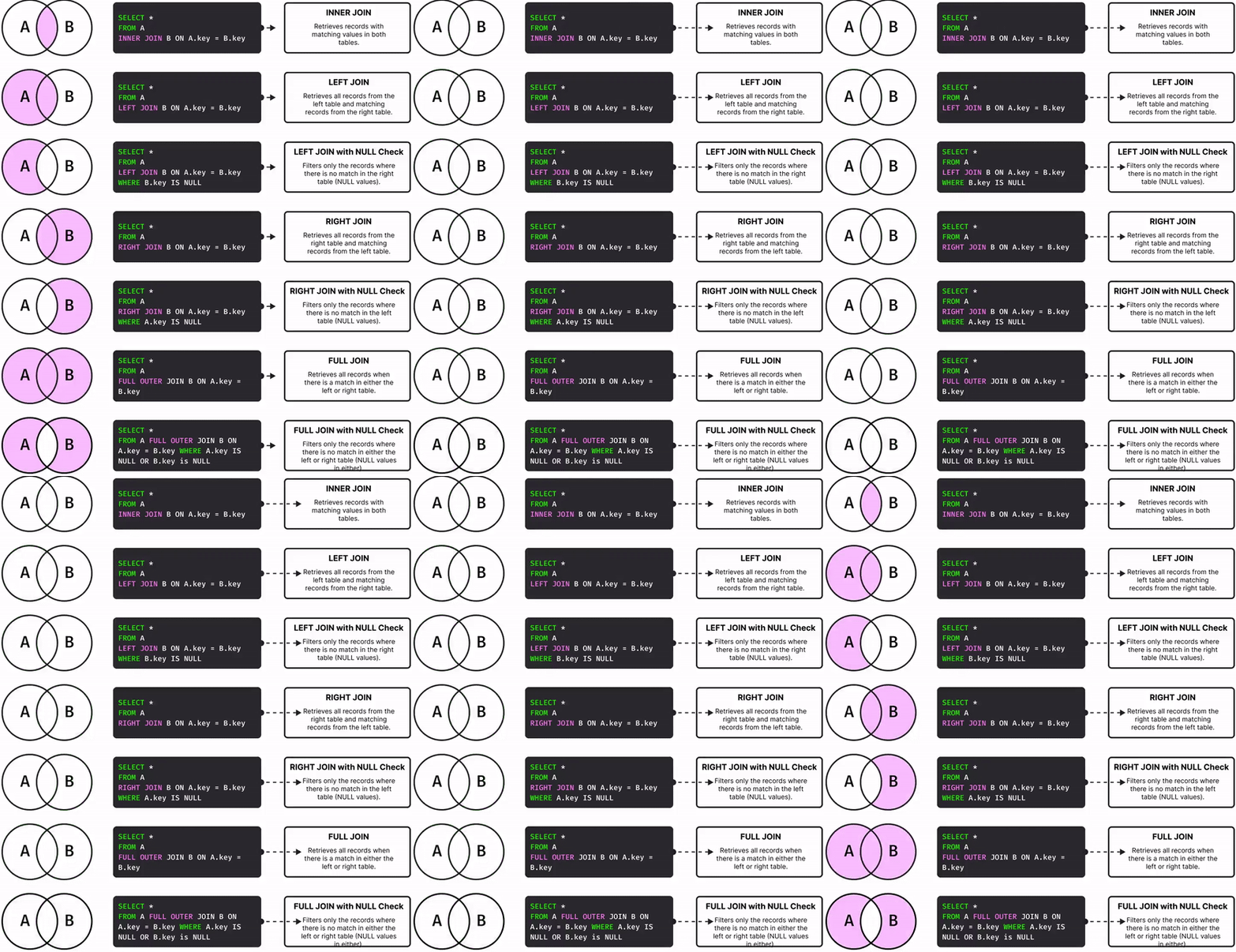
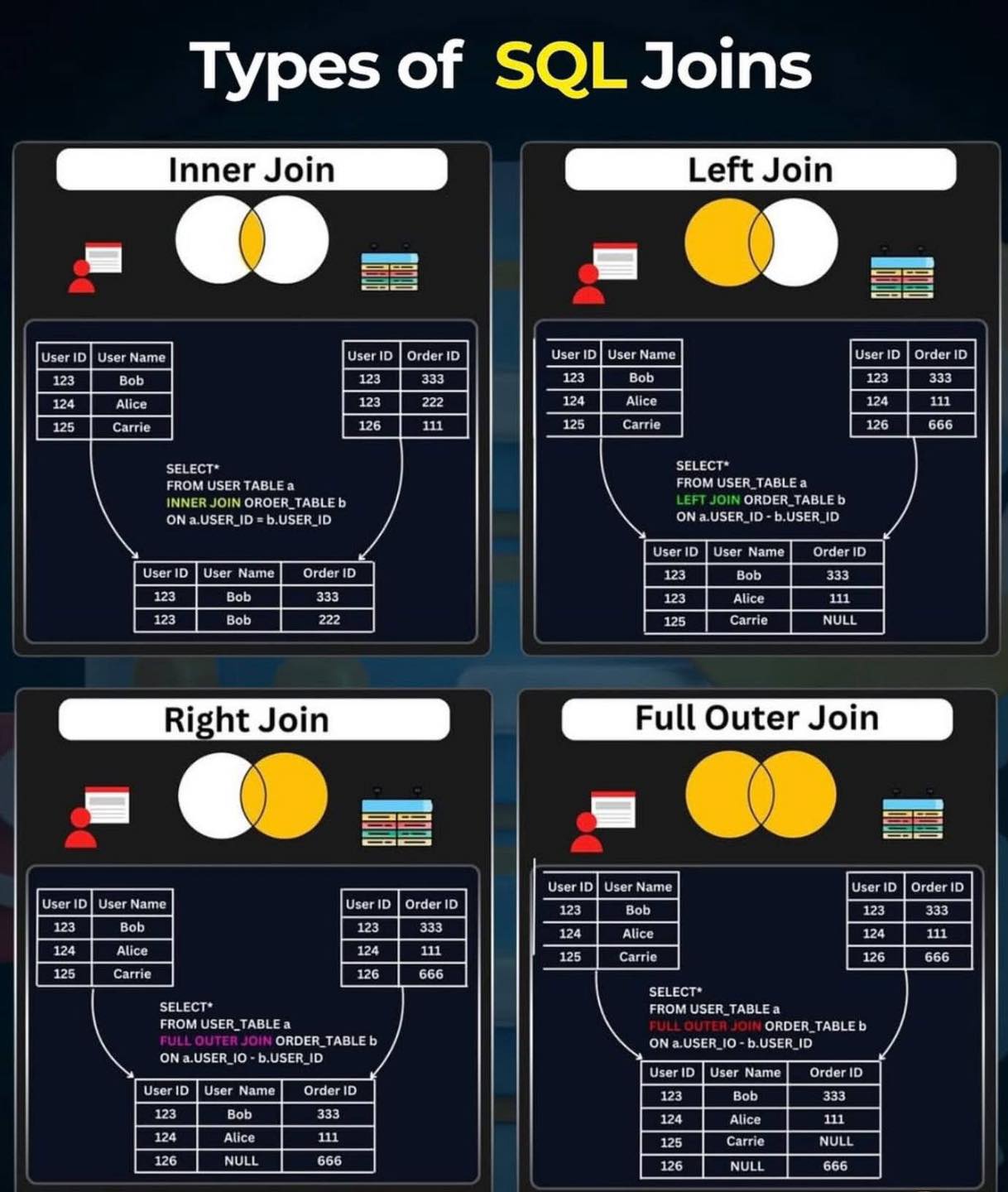
- Study different types of joins (INNER JOIN, LEFT JOIN, RIGHT JOIN, FULL JOIN) to combine data from multiple tables.
- Learn about primary keys, foreign keys, and how to establish relationships between tables.
- Dive into subqueries and how they can be used within other queries.
- Learn about common table expressions (CTEs) for creating temporary result sets.
- Explore window functions for advanced data analysis.
- Understand more advanced DML concepts like MERGE (UPSERT) statements.
- Learn about transactions and how to manage them using BEGIN, COMMIT, and ROLLBACK.
- Learn about creating, altering, and dropping tables using DDL statements.
- Explore data types, constraints, and indexes.
Remember that learning SQL is an ongoing process. Practice is key, so work on real-world examples and projects to solidify your skills.
PostgreSQL Uses
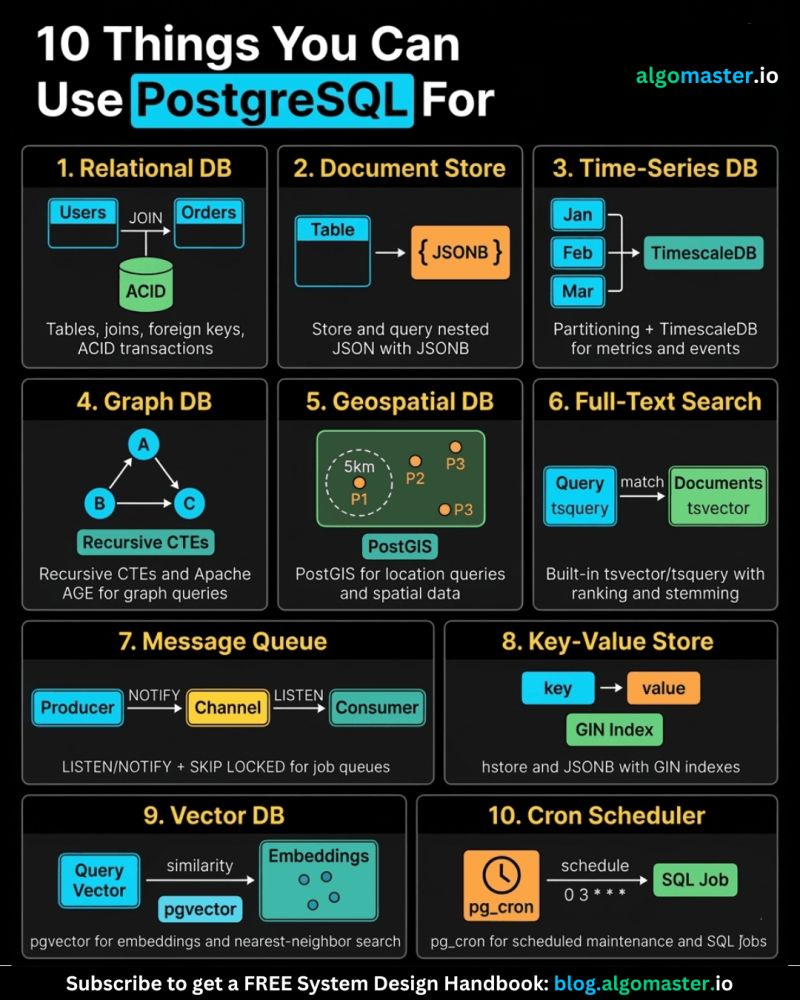
1. 𝐑𝐞𝐥𝐚𝐭𝐢𝐨𝐧𝐚𝐥 𝐃𝐚𝐭𝐚𝐛𝐚𝐬𝐞 The classic use case. PostgreSQL excels at managing structured data with tables, relationships, joins, constraints, and fully ACID-compliant transactions.
2. 𝐃𝐨𝐜𝐮𝐦𝐞𝐧𝐭 𝐒𝐭𝐨𝐫𝐞 PostgreSQL supports JSON and JSONB natively, so you can store and query semi-structured data with ease.
3. 𝐓𝐢𝐦𝐞-𝐒𝐞𝐫𝐢𝐞𝐬 𝐃𝐚𝐭𝐚𝐛𝐚𝐬𝐞 You can use native table partitioning for time-based data, or add TimescaleDB for features like automatic chunking, compression, and continuous aggregates.
4. 𝐆𝐫𝐚𝐩𝐡 𝐃𝐚𝐭𝐚𝐛𝐚𝐬𝐞 Recursive CTEs allow you to model and traverse hierarchies and graph-like relationships directly in SQL. For more advanced graph workloads, the Apache AGE extension brings Cypher query support to PostgreSQL.
5. 𝐆𝐞𝐨𝐬𝐩𝐚𝐭𝐢𝐚𝐥 𝐃𝐚𝐭𝐚𝐛𝐚𝐬𝐞 With PostGIS, PostgreSQL becomes a powerful geospatial database. You can store points, polygons, and other geometries, then run spatial queries like “find all restaurants within 5 km” with excellent performance.
6. 𝐅𝐮𝐥𝐥-𝐓𝐞𝐱𝐭 𝐒𝐞𝐚𝐫𝐜𝐡 𝐄𝐧𝐠𝐢𝐧𝐞 PostgreSQL includes built-in full-text search capabilities through tsvector and tsquery. You get indexing, ranking, stemming, and relevance-based search without needing a separate search engine for many use cases.
7. 𝐌𝐞𝐬𝐬𝐚𝐠𝐞 𝐐𝐮𝐞𝐮𝐞 PostgreSQL can also power lightweight messaging systems. LISTEN/NOTIFY enables pub/sub communication between connections, and SELECT ... FOR UPDATE SKIP LOCKED helps you build reliable job queues directly inside the database.
8. 𝐊𝐞𝐲-𝐕𝐚𝐥𝐮𝐞 𝐒𝐭𝐨𝐫𝐞 Using hstore or JSONB, PostgreSQL can serve as a key-value store as well. Both support indexing, which makes lookups fast. It can be a practical lightweight alternative to Redis for some workloads.
9. 𝐕𝐞𝐜𝐭𝐨𝐫 𝐃𝐚𝐭𝐚𝐛𝐚𝐬𝐞 With the pgvector extension, PostgreSQL can store embeddings and perform vector similarity search. You can create HNSW or IVFFlat indexes and run nearest-neighbor queries, making it a solid option for AI/ML applications.
10. 𝐂𝐫𝐨𝐧 𝐉𝐨𝐛 𝐒𝐜𝐡𝐞𝐝𝐮𝐥𝐞𝐫 With pg_cron, PostgreSQL can schedule recurring jobs directly from the database. This is useful for tasks like cleanup jobs, rollups, reporting, and maintenance workflows.
Choosing a Database
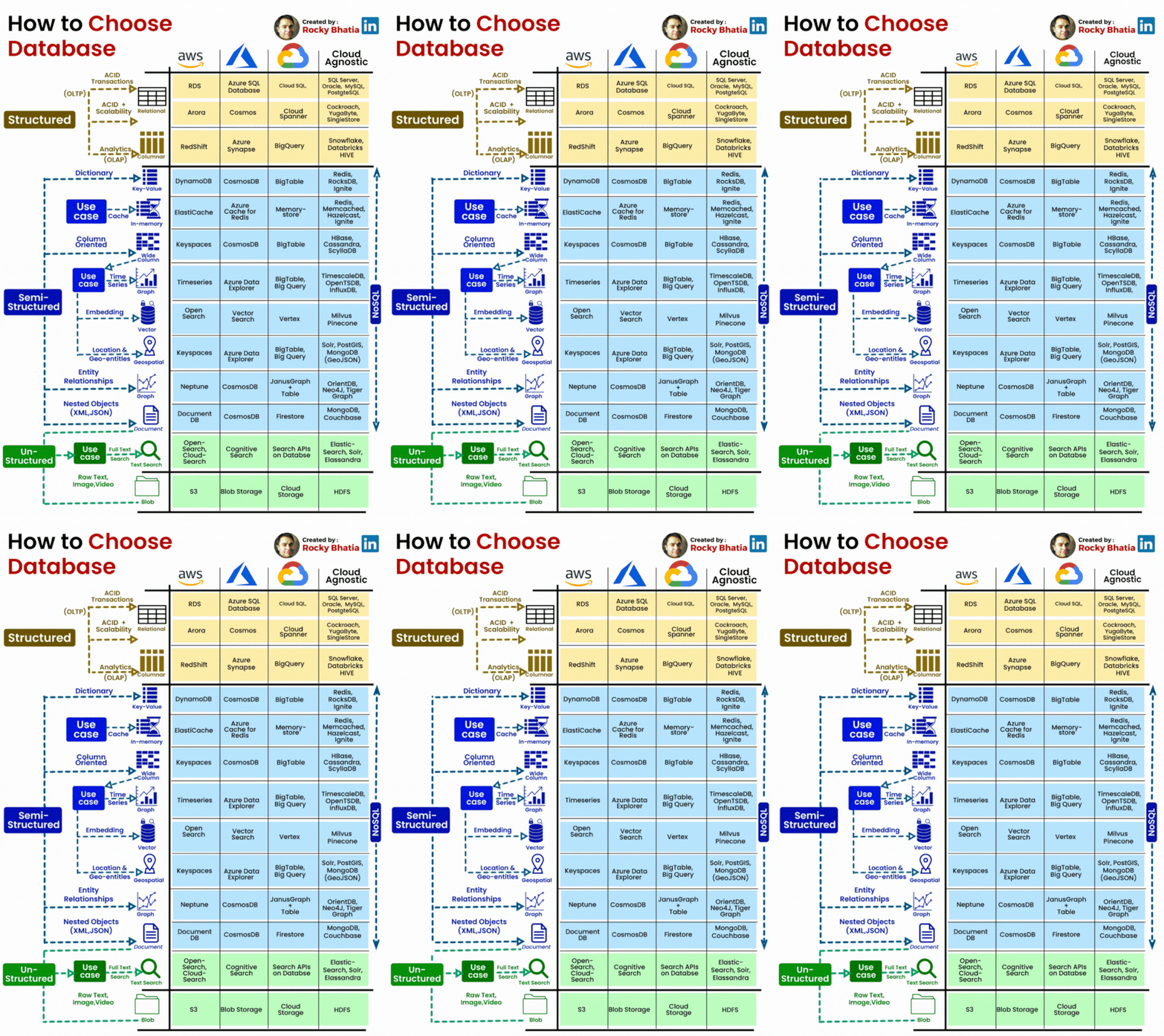
#database #sql #nosql #acid #aws #azure #gcp
Here are steps to help you choose the appropriate database:
𝗨𝗻𝗱𝗲𝗿𝘀𝘁𝗮𝗻𝗱 𝗬𝗼𝘂𝗿 𝗗𝗮𝘁𝗮 𝗥𝗲𝗾𝘂𝗶𝗿𝗲𝗺𝗲𝗻𝘁𝘀
Analyze the nature of your data, including its structure, volume, and complexity. Determine if your data is structured (relational), semistructured (like JSON or XML), or unstructured (e.g., text, images). Consider the growth rate of your data and whether it's transactional or analytical.
𝗜𝗱𝗲𝗻𝘁𝗶𝗳𝘆 𝗬𝗼𝘂𝗿 𝗨𝘀𝗲 𝗖𝗮𝘀𝗲𝘀:
Define the specific use cases your application will have, such as read heavy, write heavy, complex queries, realtime analytics, or simple CRUD operations.
𝗦𝗰𝗮𝗹𝗮𝗯𝗶𝗹𝗶𝘁𝘆 𝗥𝗲𝗾𝘂𝗶𝗿𝗲𝗺𝗲𝗻𝘁𝘀:
Determine if your application needs to scale horizontally (adding more servers) or vertically (upgrading server resources). Look at the database's ability to handle increased loads and traffic.
𝗗𝗮𝘁𝗮 𝗖𝗼𝗻𝘀𝗶𝘀𝘁𝗲𝗻𝗰𝘆:
Decide whether your application requires strict ACID (Atomicity, Consistency, Isolation, Durability) compliance or if eventual consistency is acceptable.
𝗤𝘂𝗲𝗿𝘆 𝗖𝗼𝗺𝗽𝗹𝗲𝘅𝗶𝘁𝘆:
Consider the types of queries your application will run and whether the database can efficiently handle them. Evaluate the indexing and querying capabilities.
𝐃𝐚𝐭𝐚 𝐌𝐨𝐝𝐞𝐥:
Choose between relational databases (SQL) and NoSQL databases based on your data structure and query requirements.
𝗖𝗼𝗺𝗽𝗮𝘁𝗶𝗯𝗶𝗹𝗶𝘁𝘆 𝘄𝗶𝘁𝗵 𝗧𝗲𝗰𝗵𝗻𝗼𝗹𝗼𝗴𝘆 𝗦𝘁𝗮𝗰𝗸:
Ensure that the selected database integrates well with your existing technology stack and frameworks.
𝗙𝘂𝘁𝘂𝗿𝗲 𝗚𝗿𝗼𝘄𝘁𝗵:
Think about the longterm scalability and growth of your application and whether the chosen database can accommodate future needs.
Based on my understanding, I've compiled a list of databases, which I've updated from the diagram initially provided by Satish Gupta. Please note that this list may not cover all databases, and I might have overlooked some. Additionally, there may be databases that can serve multiple use cases. The intention here is to categorise databases based on use cases or sql/nosql/newsql databases