christova  

Java

#java #springboot #spring

Spring Boot is a module of the Spring Framework. It is used to create stand-alone, production-grade Spring Based Applications with minimum efforts. It is developed on top of the core Spring Framework

Spring Boot follows a layered architecture in which each layer communicates with the layer directly below or above (hierarchical structure) it.

Before understanding the Spring Boot Architecture, we must know the different layers and classes present in it. There are four layers in Spring Boot are as follows:

Presentation Layer Business Layer Persistence Layer Database Layer

Presentation Layer: The presentation layer handles the HTTP requests, translates the JSON parameter to object, and authenticates the request and transfer it to the business layer. In short, it consists of views i.e., frontend part.

Business Layer: The business layer handles all the business logic. It consists of service classes and uses services provided by data access layers. It also performs authorization and validation.

Persistence Layer: The persistence layer contains all the storage logic and translates business objects from and to database rows.

Database Layer: In the database layer, CRUD (create, retrieve, update, delete) operations are performed.

Spring Boot Flow Architecture Now we have validator classes, view classes, and utility classes. Spring Boot uses all the modules of Spring-like Spring MVC, Spring Data, etc. The architecture of Spring Boot is the same as the architecture of Spring MVC, except one thing: there is no need for DAO and DAOImpl classes in Spring boot. Creates a data access layer and performs CRUD operation. The client makes the HTTP requests (PUT or GET). The request goes to the controller, and the controller maps that request and handles it. After that, it calls the service logic if required. In the service layer, all the business logic performs. It performs the logic on the data that is mapped to JPA with model classes. A JSP page is returned to the user if no error occurred..

I recently came across a developer by the name Kenny Yip who generously provides tutorials focused on Java, Python, C++ and more. Two main links of his to please check out:

https://www.youtube.com/@KennyYipCoding

https://www.kennyyipcoding.com/

Kenny’s content is great; he is popular and does an excellent job of educating, encouraging and embracing those on the path of learning software development. Regardless of which stage you’re at on the journey of coding and creating IT solutions, Kenny has a spirit which can lift you up a step from either beginner-to-intermediate, or give you an enjoyable refreshing reminder of your hard-earned advanced—technical-chops.

The world is your Yippee-ki-yay, mothercrusher!

#kenny-yip #kennyyipcoding #java #python #c++

#java #jvm #virtulisation #stack #thread

𝐓𝐡𝐞 𝐏𝐨𝐰𝐞𝐫 𝐨𝐟 𝐉𝐚𝐯𝐚: 𝐀 𝐏𝐞𝐞𝐤 𝐈𝐧𝐬𝐢𝐝𝐞 𝐭𝐡𝐞 𝐉𝐕𝐌 𝐌𝐚𝐜𝐡𝐢𝐧𝐞

Ever wondered what makes Java so robust and platform-independent?

Let’s dive into the heart of Java – the Java Virtual Machine (JVM)

1. 📚 Class LoaderStarts the show by loading those .class files. It doesn't just load any code; it ensures the code is legit!

2. 🔍 Bytecode VerifierActs as the gatekeeper, checking the bytecode to make sure it plays by the rules – safe and secure before execution.

3. 🧠 Execution EngineThis is where the magic happens! It converts bytecode into native machine code. Whether it’s interpreting it line-by-line, or compiling it on the fly with Just-In-Time (JIT) compilation, it’s all about speed and efficiency

.4. 🗄️ Memory AreaJVM’s powerhouse! It manages various memory areas like the heap for object storage, stack for method execution tracks, and more to ensure smooth operation and GC (Garbage Collection) to clean up after the party

.5. 🎛️ Runtime Data AreasHere, JVM manages runtime data, method calls, and returns results. Like a well-oiled machine, it keeps everything running smoothly.

6. 🗂️ Native Interface & LibraryWhen JVM needs a break, it uses native methods. The Native Interface links Java to libraries written in languages like C or C++, expanding its capabilities beyond java

In essence, JVM is like a high-tech factory that turns Java bytecode into the action your device understands and executes. It’s why Java runs everywhere – from your toaster to data centers!

#java #javaprogramming #javaprogramminginanutshell

1. Syntax and Data Types: – Basic syntax and structure of Java programs. – Primitive data types (int, float, boolean, etc.) and their usage. – Object-oriented programming (classes, objects, inheritance, polymorphism, etc.). – Control flow statements (if-else, loops, switch, etc.).

2. Java Libraries and APIs: – Java Standard Library: Provides a wide range of classes and methods for common programming tasks, such as handling strings, input/output operations, collections, concurrency, and networking. – Java Development Kit (JDK): Includes tools for developing, debugging, and running Java applications, such as the Java Compiler (javac), Java Virtual Machine (JVM), and Java Runtime Environment (JRE). – Java Application Programming Interface (API): A collection of pre-written classes and interfaces that developers can use to build applications.

3. Exception Handling: – Handling and managing errors and exceptions that may occur during program execution. – Using try-catch blocks to catch and handle exceptions gracefully. – Throwing and creating custom exceptions.

4. Input/Output (I/O): – Reading and writing data from/to different sources (files, streams, etc.). – Working with input and output streams, readers, and writers. – Serialization and deserialization of objects.

5. Multithreading and Concurrency: – Creating and managing multiple threads to achieve concurrent execution. – Synchronization and thread safety. – Inter-thread communication and synchronization mechanisms.

6. Collections Framework: – Built-in data structures (lists, sets, maps, queues, etc.) and algorithms for manipulating and storing collections of objects. – Iterating over collections and performing operations like sorting, searching, and filtering.

7. Java Database Connectivity (JDBC): – Connecting to databases and executing SQL queries. – Retrieving, updating, and manipulating data in relational databases.

Core Java serves as the foundation for Java development, providing the necessary tools and concepts to create robust,platform-independent applications across various domains, including web development, enterprise systems, mobile apps, and more.

#java #roadmap #javadeveloper #javadeveloperroadmap

1. Learn the Fundamentals Core Java Concepts: Master the basics variables, data types, control structures, files, exception handling etc. ObjectOriented Programming (OOP): Understand key principles like encapsulation, inheritance, and polymorphism.

2. Getting Deeper Collections: Explore data structures like lists, sets, maps. Serialization: Understand how to convert Java objects into byte streams. Threading: Dive into concurrent programming for efficient multitasking. Streams and Lambdas: Leverage functional programming for cleaner code.

3. Build Tools Maven/Gradle: Learn popular build tools for project management and dependencies.

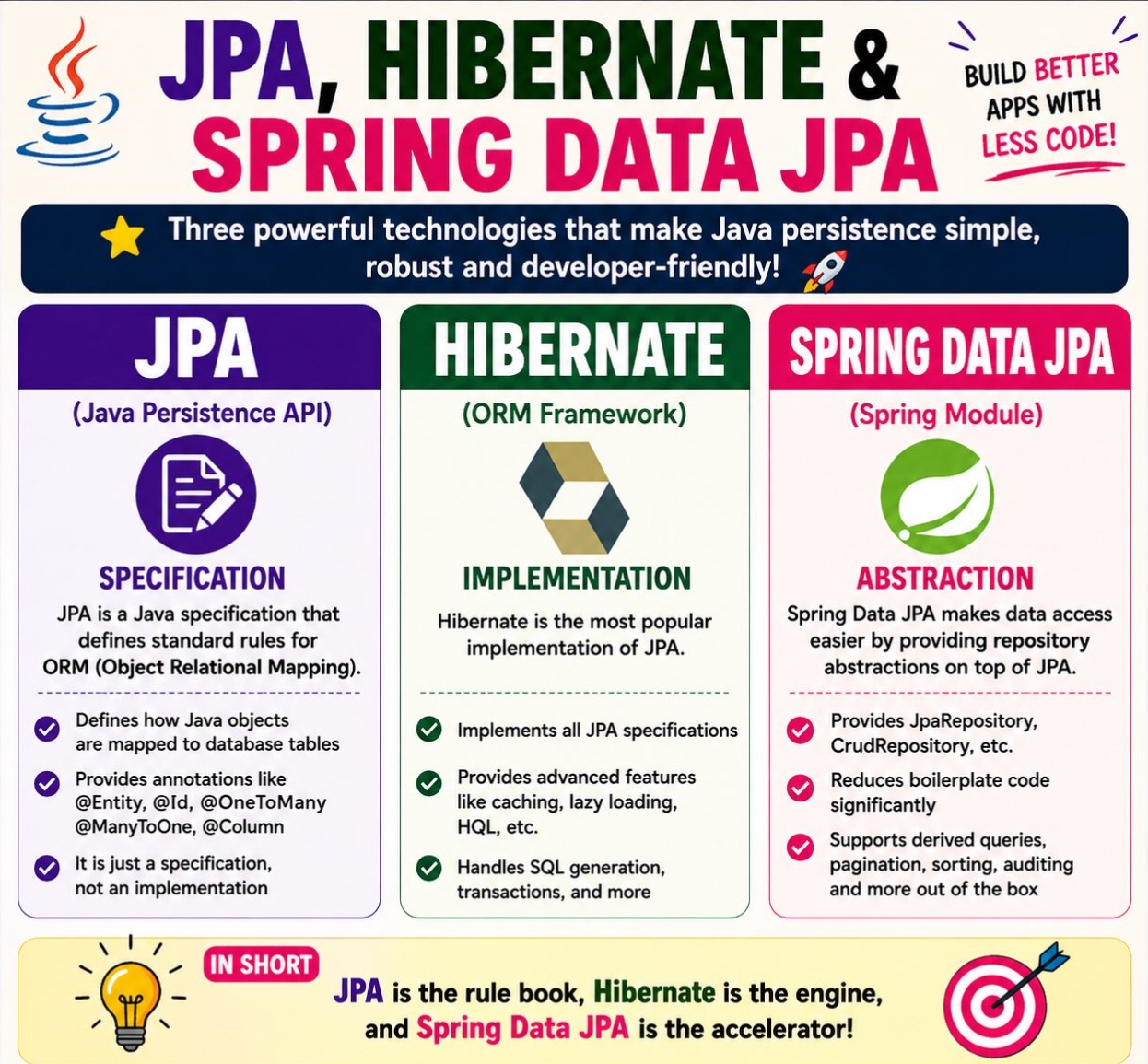
4. ORM Framework Hibernate or JPA: Dive into ObjectRelational Mapping for database interactions.

5. JDBC (Java Database Connectivity) Database Interactions: Understand how Java applications interact with databases.

6. Testing Your Apps JUnit: Master the widelyused testing framework for unit tests. Mockito: Explore mocking frameworks for effective unit testing. JMeter: Learn performance testing to ensure your application scales.

7. Logging Framework SLF4J and Logback/Log4j: Implement robust logging for debugging and monitoring.

8. Web Frameworks: Explore popular web frameworks such as Spring, Spring Boot, Play, and Struts for building robust and scalable web applications.

#java #microservices #front-end #back-end

In a microservices architecture implemented using Java, the components typically include:

1. **Microservices**: These are the individual, small, and independent services that handle specific business functionalities. Each microservice is a standalone application that can be developed, deployed, and scaled independently.

2. **API Gateway**: The API Gateway acts as the entry point for external clients to access the microservices. It handles requests from clients, routes them to the appropriate microservices, and may perform tasks like authentication, rate limiting, and request/response transformations.

3. **Service Registry and Discovery**: To enable communication between microservices, a service registry and discovery mechanism is used. It keeps track of all running instances of microservices and allows other services to find and communicate with them without knowing their physical locations.

4. **Database per Service**: Each microservice typically has its own dedicated database, which ensures data isolation and autonomy for individual services. This approach avoids direct database coupling between services.

5. **Asynchronous Communication**: Microservices often use messaging systems like Apache Kafka or RabbitMQ for asynchronous communication between services. This allows services to exchange events and messages without immediate response requirements.

6. **Containerization**: Microservices are often deployed within containers (e.g., Docker) to ensure consistency across different environments and facilitate scalability.

7. **Continuous Integration and Deployment (CI/CD)**: Automation is crucial in a microservices environment. CI/CD pipelines are used to automate testing, building, and deploying microservices.

8. **Monitoring and Logging**: Monitoring tools are essential to keep track of the health and performance of microservices. Proper logging mechanisms are also crucial for debugging and troubleshooting.

9. **Load Balancing**: As microservices can be deployed across multiple instances, load balancers help distribute incoming traffic across these instances, ensuring even distribution and high availability.

10. **Security**: Security measures like access control, authentication, and authorization are crucial in a microservices environment to protect sensitive data and ensure secure communication between services.

These components work together to create a scalable, maintainable, and resilient microservices architecture in Java. However, the specific implementation of each component may vary based on the framework and tools chosen for the project.