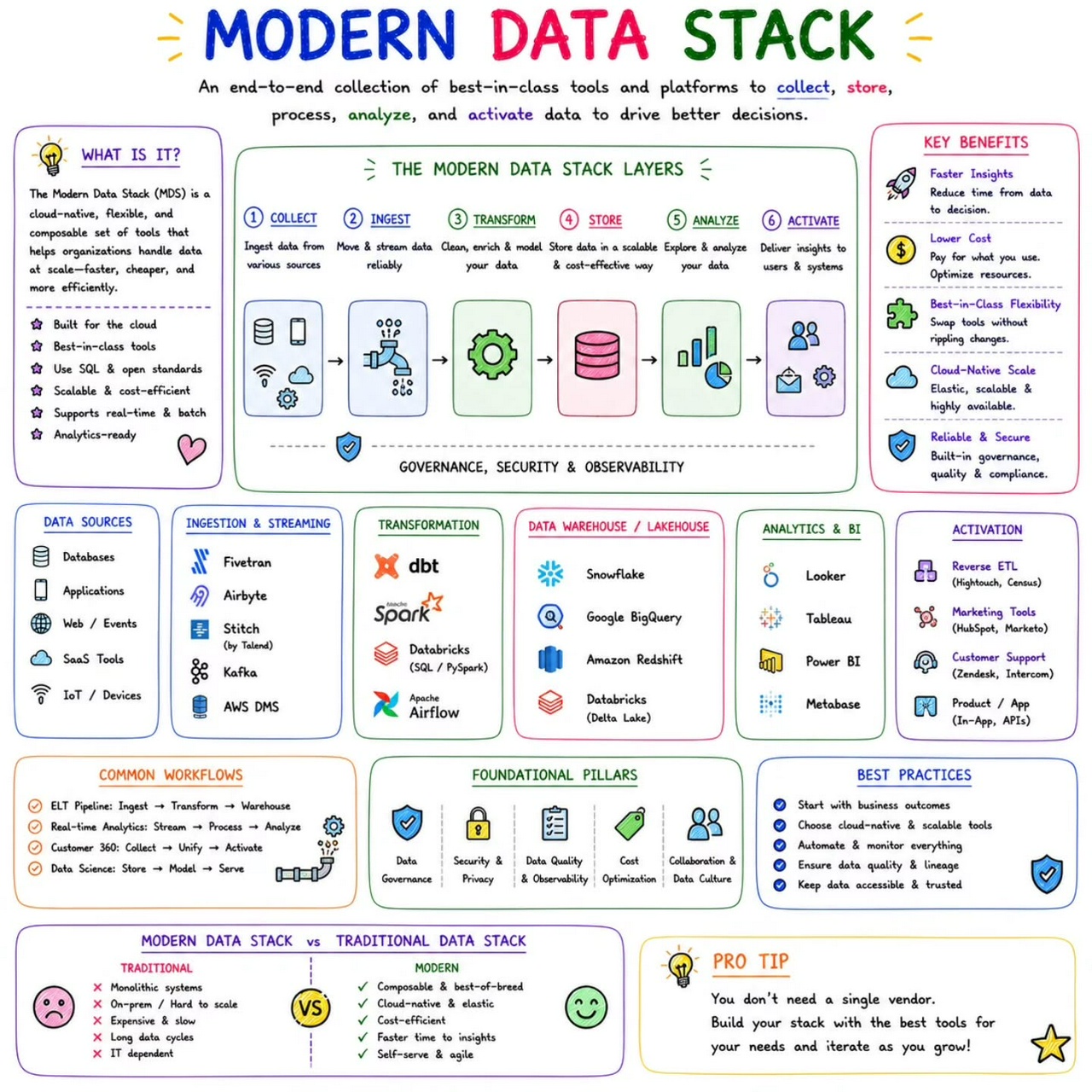
Modern Data Stack
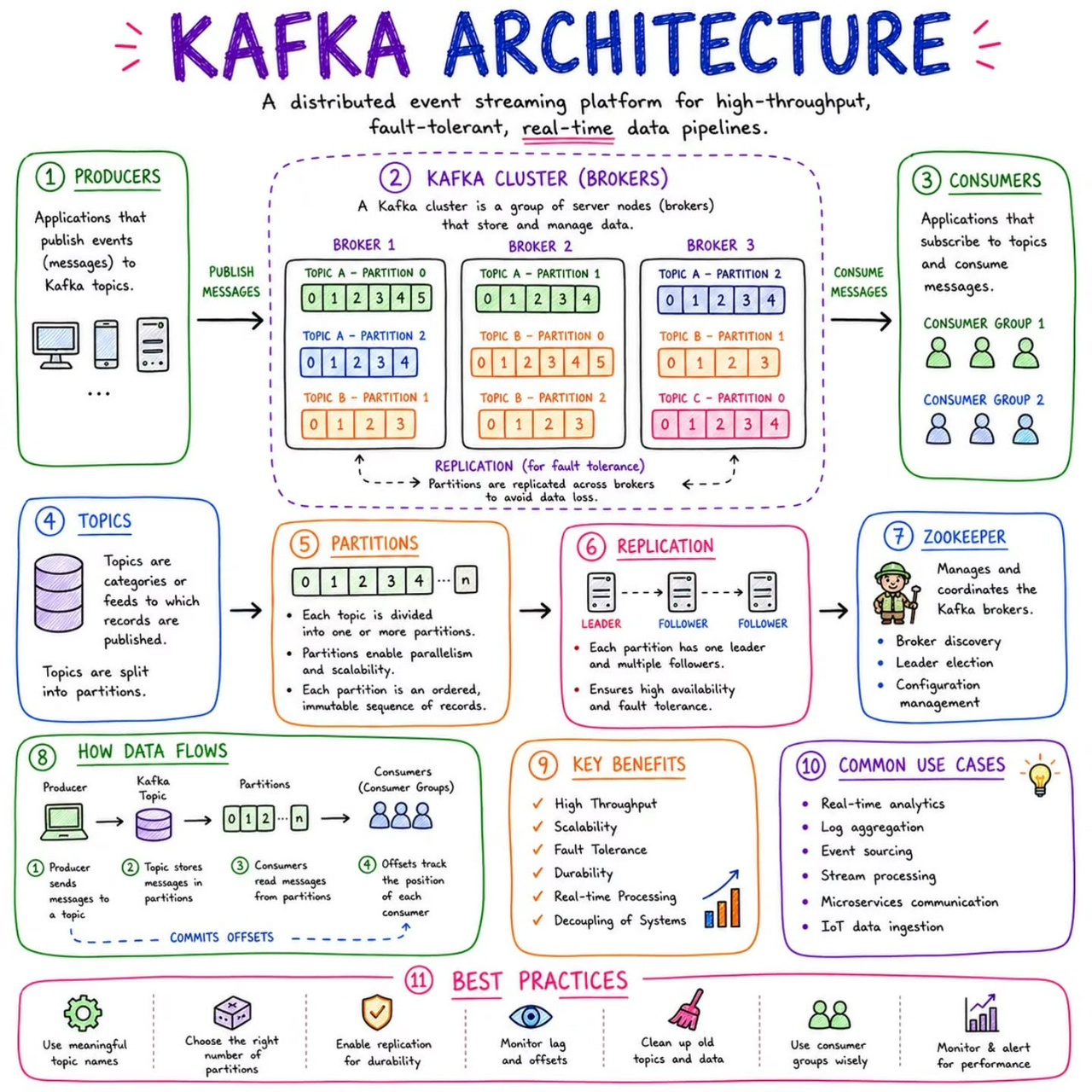
Kafka Architecture
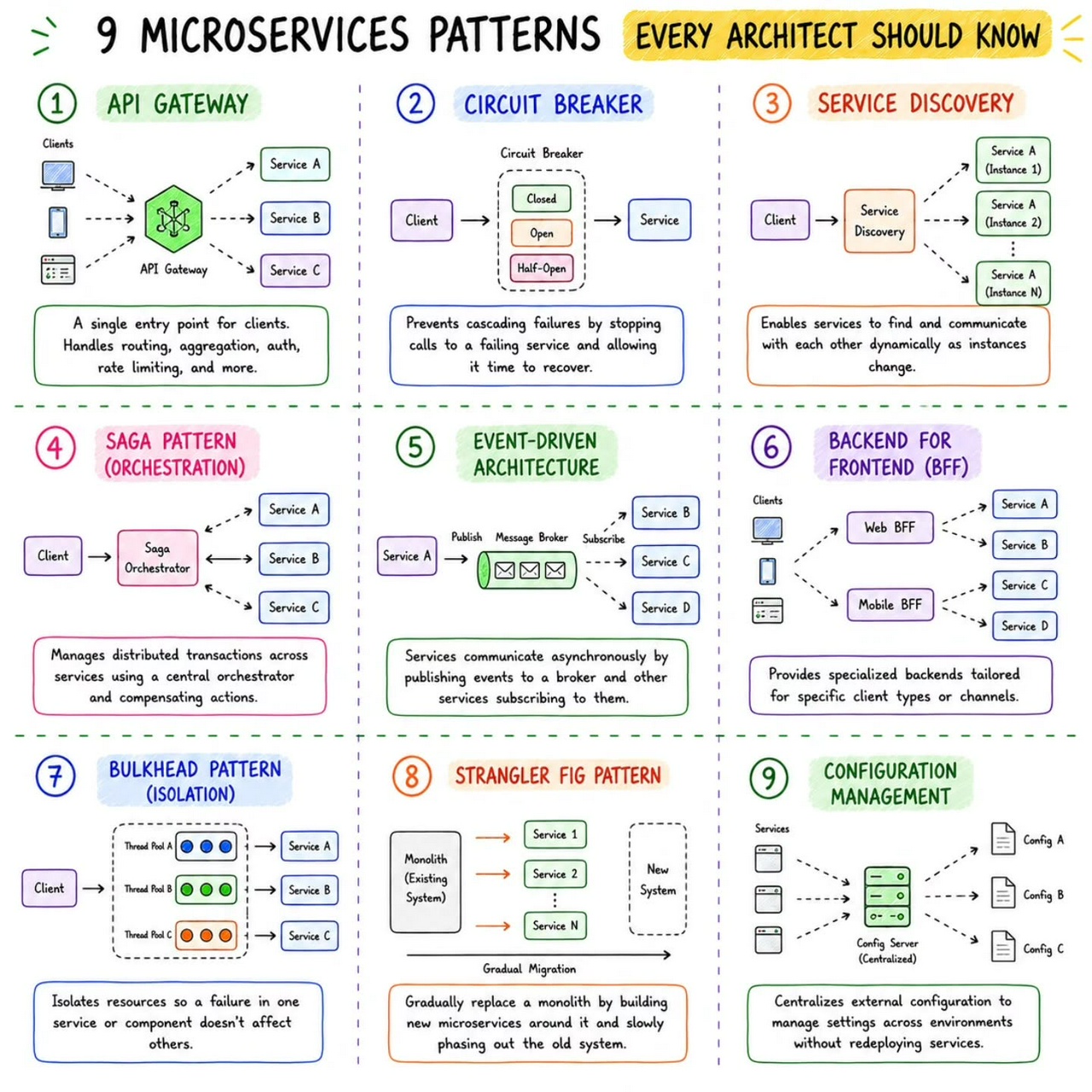
Microservice Patterns
SOLID Principles
#SOLID #solidprinciples #objectoriented #oop
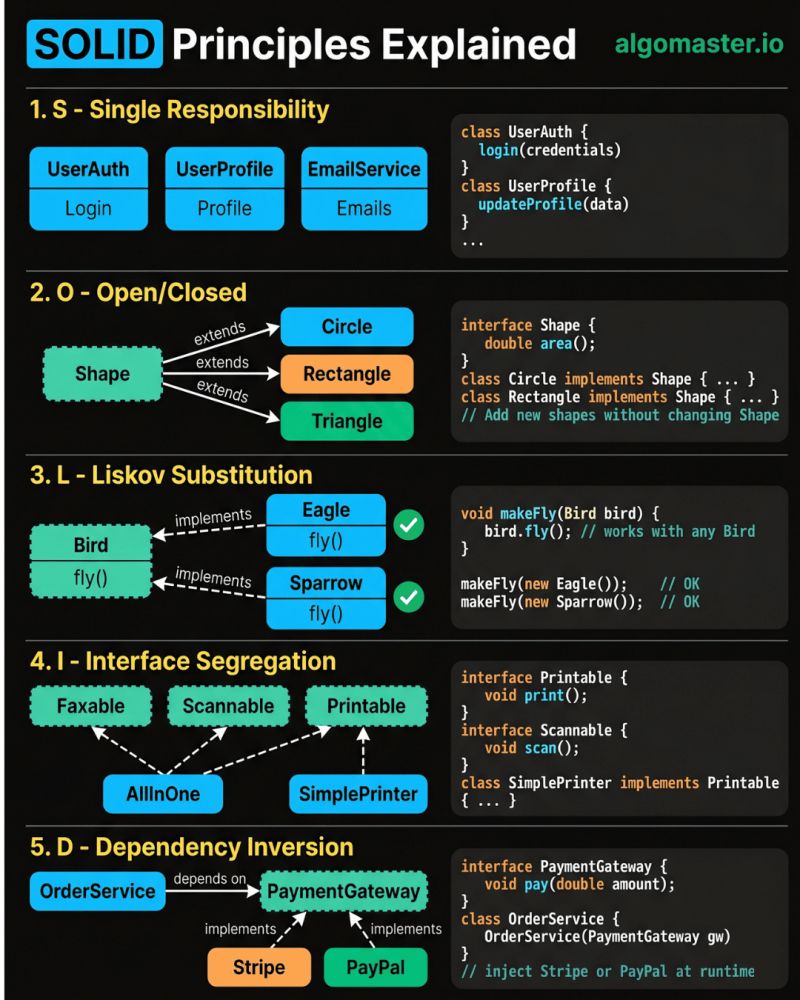
𝐒 – 𝐒𝐢𝐧𝐠𝐥𝐞 𝐑𝐞𝐬𝐩𝐨𝐧𝐬𝐢𝐛𝐢𝐥𝐢𝐭𝐲 𝐏𝐫𝐢𝐧𝐜𝐢𝐩𝐥𝐞 A class should have only one reason to change. - Example: Instead of one giant User class that handles authentication, profile updates, and sending emails, split it into UserAuth, UserProfile, and EmailService.
𝐎 – 𝐎𝐩𝐞𝐧/𝐂𝐥𝐨𝐬𝐞𝐝 𝐏𝐫𝐢𝐧𝐜𝐢𝐩𝐥𝐞 Classes should be open for extension but closed for modification. - Example: Define a Shape interface with an area() method. When you need a new shape, just add a Circle or Triangle class that implements it.
𝐋 – 𝐋𝐢𝐬𝐤𝐨𝐯 𝐒𝐮𝐛𝐬𝐭𝐢𝐭𝐮𝐭𝐢𝐨𝐧 𝐏𝐫𝐢𝐧𝐜𝐢𝐩𝐥𝐞 Subtypes must be substitutable for their base types without breaking behavior. - Example: If Bird has a fly() method, then Eagle and Sparrow should both work anywhere a Bird is expected.
𝐈 – 𝐈𝐧𝐭𝐞𝐫𝐟𝐚𝐜𝐞 𝐒𝐞𝐠𝐫𝐞𝐠𝐚𝐭𝐢𝐨𝐧 𝐏𝐫𝐢𝐧𝐜𝐢𝐩𝐥𝐞 Don't force classes to implement interfaces they don't use. - Example: Instead of one fat Machine interface with print(), scan(), and fax(), break it into Printable, Scannable, and Faxable. A SimplePrinter only implements Printable.
𝐃 – 𝐃𝐞𝐩𝐞𝐧𝐝𝐞𝐧𝐜𝐲 𝐈𝐧𝐯𝐞𝐫𝐬𝐢𝐨𝐧 𝐏𝐫𝐢𝐧𝐜𝐢𝐩𝐥𝐞 High-level modules should not depend on low-level modules. Both should depend on abstractions. - Example: Your OrderService should depend on a PaymentGateway interface, not directly on Stripe or PayPal.
The real power of SOLID is not in following each principle in isolation. It's in how they work together to make your code easier to change, test, and extend.
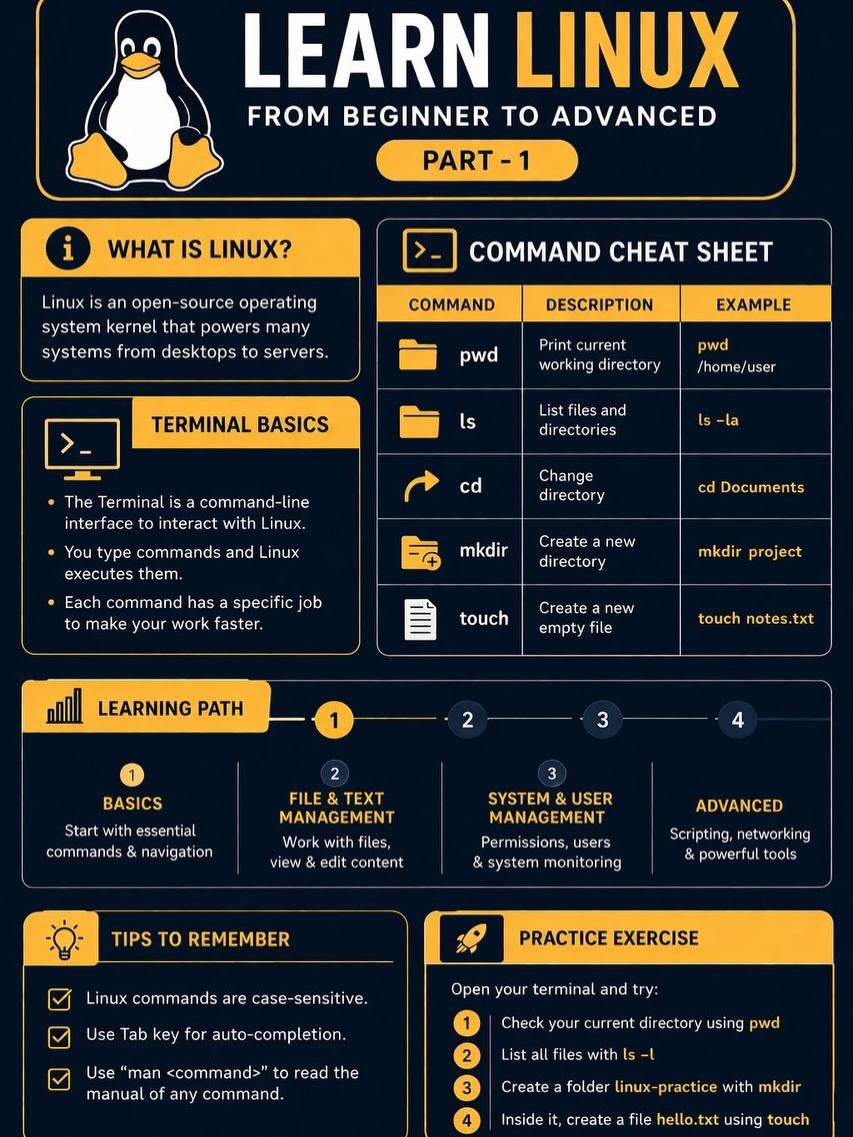
Learn Linux (part 1)
SSH Commands
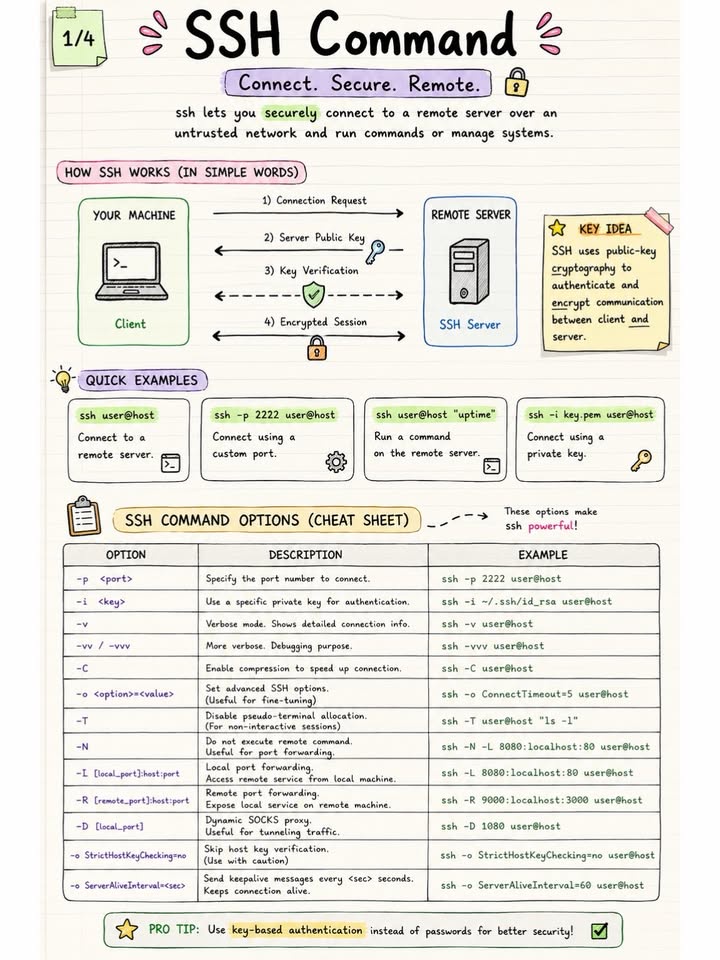
SSH is one of the most important tools in Linux & DevOps.
But most engineers only use: ssh user@host
without understanding what actually happens underneath.
In this series: 🔐 How SSH creates a secure encrypted tunnel 🧠 How authentication & key exchange work ⚙️ Important SSH command options explained 🛡️ Security best practices for production servers
Topics covered: • SSH workflow • Public/private key authentication • Encryption & integrity • Host verification • Port forwarding • Debugging flags • Secure SSH practices
💡 Pro Tip: Always prefer key-based authentication over passwords.
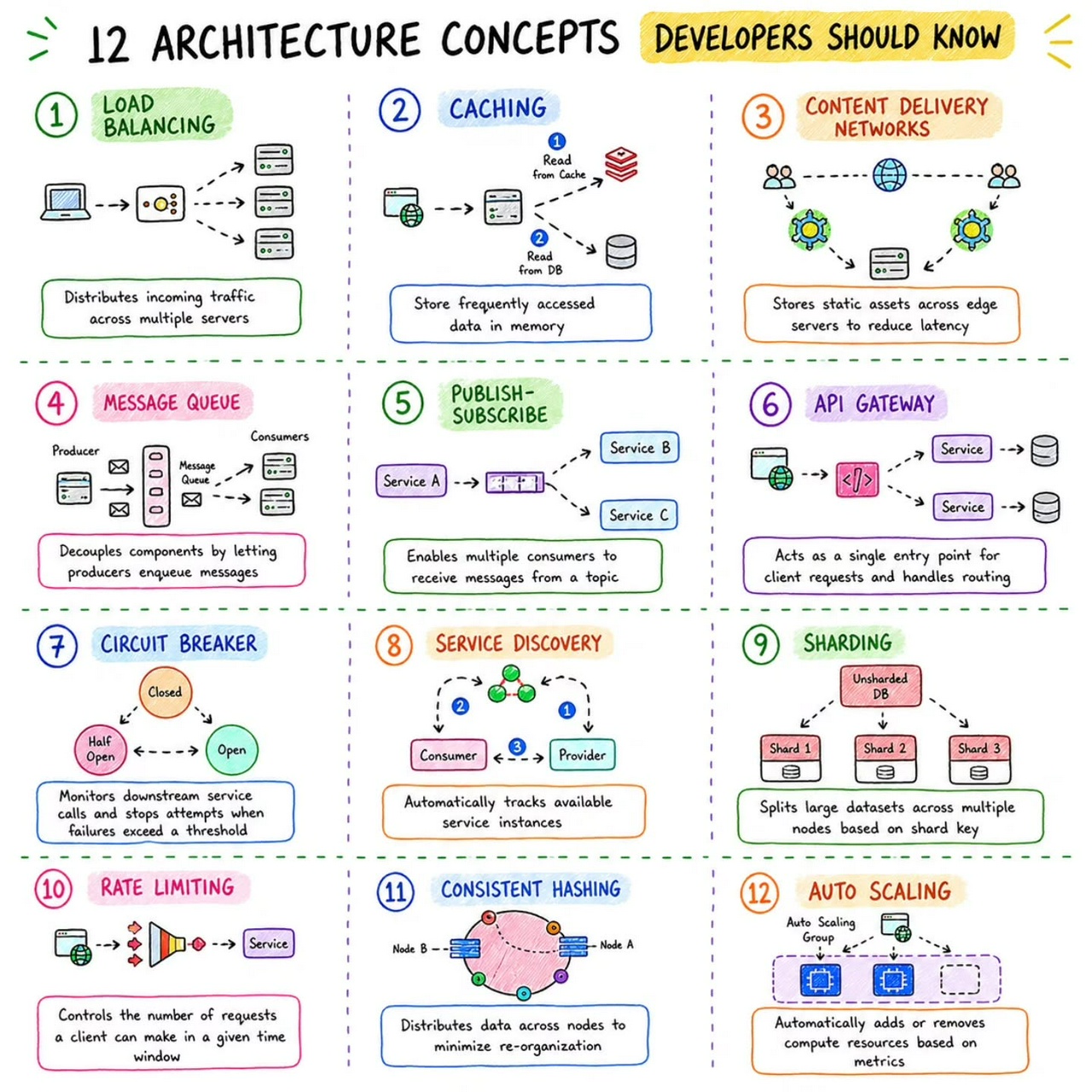
Architecture Concepts
Big O Complexities
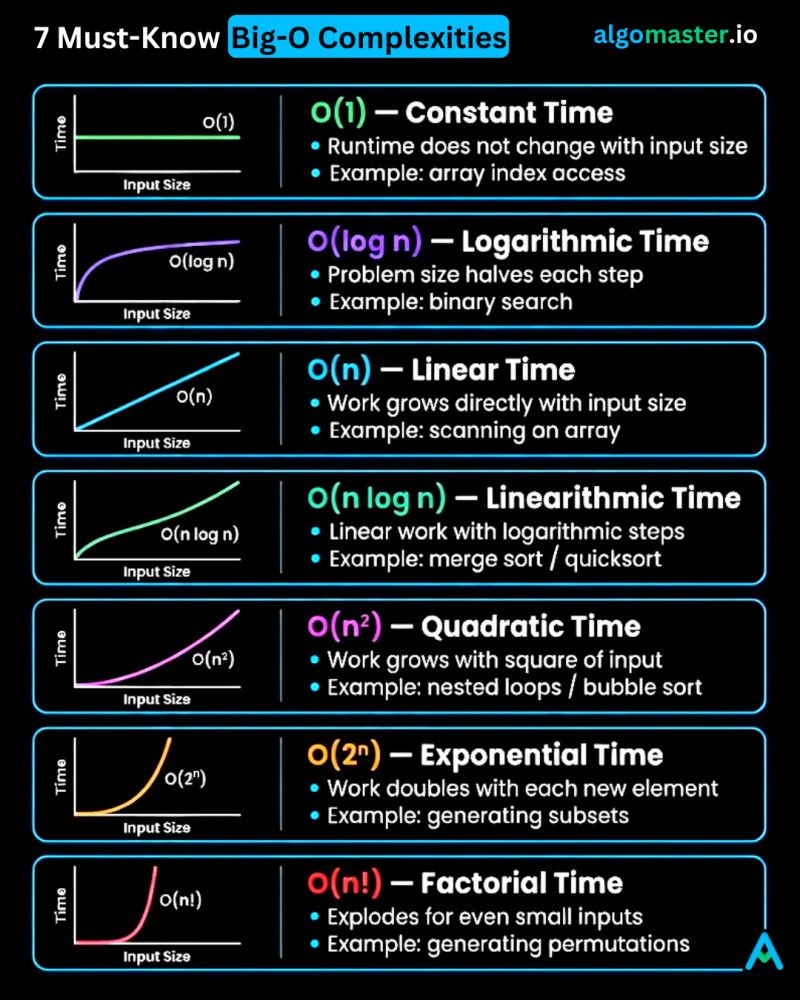
1. 𝐎(1) – 𝐂𝐨𝐧𝐬𝐭𝐚𝐧𝐭 𝐭𝐢𝐦𝐞 - The runtime doesn't change regardless of the input size. - Example: Accessing an element in an array by its index.
2. 𝐎(𝐥𝐨𝐠 𝐧) – 𝐋𝐨𝐠𝐚𝐫𝐢𝐭𝐡𝐦𝐢𝐜 𝐭𝐢𝐦𝐞 - The runtime grows slowly as the input size increases. Typically seen in algorithms that divide the problem in half with each step. - Example: Binary search in a sorted array.
3. 𝐎(𝐧) – 𝐋𝐢𝐧𝐞𝐚𝐫 𝐭𝐢𝐦𝐞 - The runtime grows linearly with the input size. - Example: Finding an element in an array by iterating through each element.
4. 𝐎(𝐧 𝐥𝐨𝐠 𝐧) – 𝐋𝐢𝐧𝐞𝐚𝐫𝐢𝐭𝐡𝐦𝐢𝐜 𝐭𝐢𝐦𝐞 - The runtime grows slightly faster than linear time. It involves a logarithmic number of operations for each element in the input. - Example: Sorting an array using quick sort or merge sort.
5. 𝐎(𝐧^2) – 𝐐𝐮𝐚𝐝𝐫𝐚𝐭𝐢𝐜 𝐭𝐢𝐦𝐞 - The runtime grows proportionally to the square of the input size. - Example: Bubble sort algorithm which compares and potentially swaps every pair of elements.
6. 𝐎(2^𝐧) – 𝐄𝐱𝐩𝐨𝐧𝐞𝐧𝐭𝐢𝐚𝐥 𝐭𝐢𝐦𝐞 - The runtime doubles with each addition to the input. These algorithms become impractical for larger input sizes. - Example: Generating all subsets of a set.
7. 𝐎(𝐧!) – 𝐅𝐚𝐜𝐭𝐨𝐫𝐢𝐚𝐥 𝐭𝐢𝐦𝐞 - Runtime is proportional to the factorial of the input size. - Example: Generating all permutations of a set.