Process of a URL
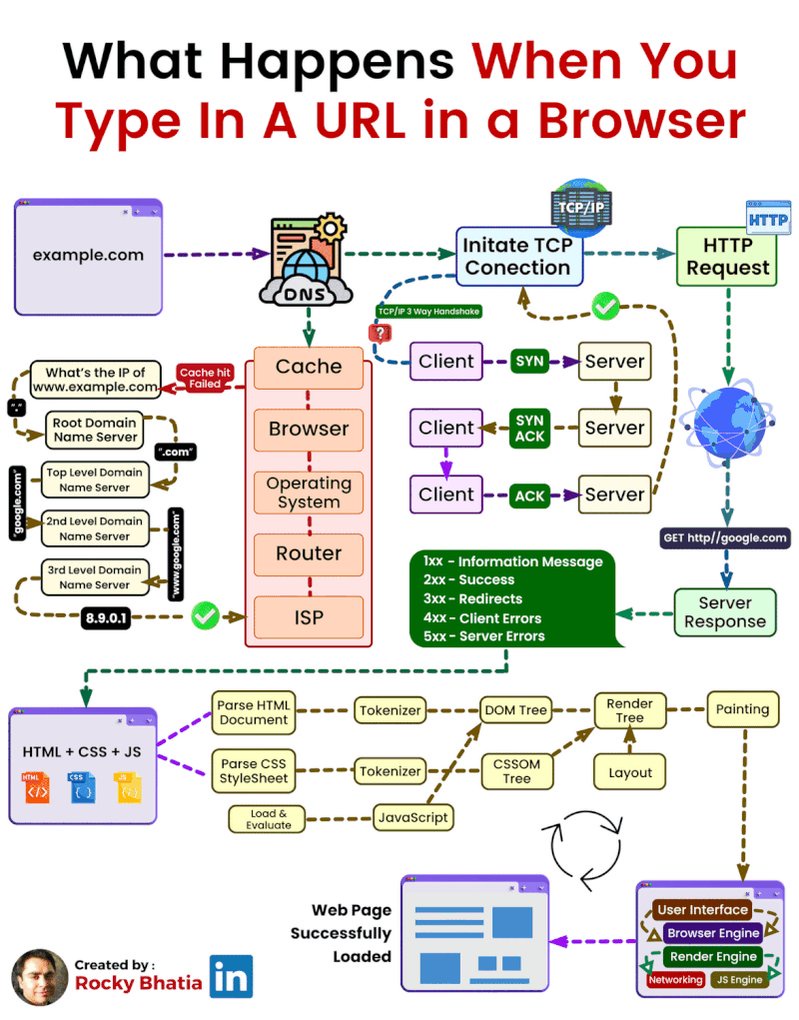
When you type a URL into your browser:
• The browser breaks the URL into components like scheme (e.g., “https”), domain (e.g., “example.com”), and path (e.g., “/page”). • If the IP address isn’t cached, it queries a DNS server to resolve it. • A connection is established with the web server using the IP and port (80 for HTTP, 443 for HTTPS). • The browser sends an HTTP request to fetch the resource. • The server responds with the requested data (HTML, CSS, JS) and a status code. • The browser renders the page by processing the HTML, applying CSS, and executing JavaScript. • Secure sites establish an SSL/TLS connection for encryption. • Resources are cached to speed up future visits. • Fast, secure, and seamless—all thanks to modern browsers!